.jpg)
JComboBox class:
The JComboBox class is used to create the combobox (drop-down list). At a time only one item can be selected from the item list.Commonly used Constructors of JComboBox class:
| JComboBox() |
| JComboBox(Object[] items) |
| JComboBox(Vector<?> items) |
Commonly used methods of JComboBox class:
| 1) public void addItem(Object anObject): is used to add an item to the item list. |
| 2) public void removeItem(Object anObject): is used to delete an item to the item list. |
| 3) public void removeAllItems(): is used to remove all the items from the list. |
| 4) public void setEditable(boolean b): is used to determine whether the JComboBox is editable. |
| 5) public void addActionListener(ActionListener a): is used to add the ActionListener. |
| 6) public void addItemListener(ItemListener i): is used to add the ItemListener. |
Example of JComboBox class:
- import javax.swing.*;
- public class Combo {
- JFrame f;
- Combo(){
- f=new JFrame("Combo ex");
- String country[]={"India","Aus","U.S.A","England","Newzeland"};
- JComboBox cb=new JComboBox(country);
- cb.setBounds(50, 50,90,20);
- f.add(cb);
- f.setLayout(null);
- f.setSize(400,500);
- f.setVisible(true);
- }
- public static void main(String[] args) {
- new Combo();
- }
- }
JTable class :
The JTable class is used to display the data on two dimensional tables of cells. Commonly used Constructors of JTable class:
JTable(): creates a table with empty cells. - JTable(Object[][] rows, Object[] columns): creates a table with the specified data.
Example of JTable class:
- import javax.swing.*;
- public class MyTable {
- JFrame f;
- MyTable(){
- f=new JFrame();
- String data[][]={ {"101","Amit","670000"},
- {"102","Jai","780000"},
- {"101","Sachin","700000"}};
- String column[]={"ID","NAME","SALARY"};
- JTable jt=new JTable(data,column);
- jt.setBounds(30,40,200,300);
- JScrollPane sp=new JScrollPane(jt);
- f.add(sp);
- f.setSize(300,400);
- // f.setLayout(null);
- f.setVisible(true);
- }
- public static void main(String[] args) {
- new MyTable();
- }
- }
ColorChooser class:
The JColorChooser class is used to create a color chooser dialog box so that user can select any color. Commonly used Constructors of JColorChooser class:
- JColorChooser(): is used to create a color chooser pane with white color initially.
- JColorChooser(Color initialColor): is used to create a color chooser pane with the specified color initially.
Commonly used methods of JColorChooser class:
public static Color showDialog(Component c, String title, Color initialColor): is used to show the color-chooser dialog box.
Example of JColorChooser class:

- import java.awt.event.*;
- import java.awt.*;
- import javax.swing.*;
- public class JColorChooserExample extends JFrame implements ActionListener{
- JButton b;
- Container c;
- JColorChooserExample(){
- c=getContentPane();
- c.setLayout(new FlowLayout());
- b=new JButton("color");
- b.addActionListener(this);
- c.add(b);
- }
- public void actionPerformed(ActionEvent e) {
- Color initialcolor=Color.RED;
- Color color=JColorChooser.showDialog(this,"Select a color",initialcolor);
- c.setBackground(color);
- }
- public static void main(String[] args) {
- JColorChooserExample ch=new JColorChooserExample();
- ch.setSize(400,400);
- ch.setVisible(true);
- ch.setDefaultCloseOperation(EXIT_ON_CLOSE);
- }
- }
JProgressBar class:
The JProgressBar class is used to display the progress of the task.
Commonly used Constructors of JProgressBar class:
- JProgressBar(): is used to create a horizontal progress bar but no string text.
- JProgressBar(int min, int max): is used to create a horizontal progress bar with the specified minimum and maximum value.
- JProgressBar(int orient): is used to create a progress bar with the specified orientation, it can be either Vertical or Horizontal by using SwingConstants.VERTICAL and SwingConstants.HORIZONTAL constants.
- JProgressBar(int orient, int min, int max): is used to create a progress bar with the specified orientation, minimum and maximum value.
Commonly used methods of JProgressBar class:
1) public void setStringPainted(boolean b): is used to determine whether string should be displayed. 2) public void setString(String s): is used to set value to the progress string. 3) public void setOrientation(int orientation): is used to set the orientation, it may be either vertical or horizontal by using SwingConstants.VERTICAL and SwingConstants.HORIZONTAL constants.. 4) public void setValue(int value): is used to set the current value on the progress bar. Example of JProgressBar class:
- import javax.swing.*;
- public class MyProgress extends JFrame{
- JProgressBar jb;
- int i=0,num=0;
- MyProgress(){
- jb=new JProgressBar(0,2000);
- jb.setBounds(40,40,200,30);
- jb.setValue(0);
- jb.setStringPainted(true);
- add(jb);
- setSize(400,400);
- setLayout(null);
- }
- public void iterate(){
- while(i<=2000){
- jb.setValue(i);
- i=i+20;
- try{Thread.sleep(150);}catch(Exception e){}
- }
- }
- public static void main(String[] args) {
- MyProgress m=new MyProgress();
- m.setVisible(true);
- m.iterate();
- }
- }
JSlider class:
The JSlider is used to create the slider. By using JSlider a user can select a value from a specific range. Commonly used Constructors of JSlider class:
- JSlider(): creates a slider with the initial value of 50 and range of 0 to 100.
- JSlider(int orientation): creates a slider with the specified orientation set by either JSlider.HORIZONTAL or JSlider.VERTICAL with the range 0 to 100 and initial value 50.
- JSlider(int min, int max): creates a horizontal slider using the given min and max.
- JSlider(int min, int max, int value): creates a horizontal slider using the given min, max and value.
- JSlider(int orientation, int min, int max, int value): creates a slider using the given orientation, min, max and value.
Commonly used Methods of JSlider class:
1) public void setMinorTickSpacing(int n): is used to set the minor tick spacing to the slider. 2) public void setMajorTickSpacing(int n): is used to set the major tick spacing to the slider. 3) public void setPaintTicks(boolean b): is used to determine whether tick marks are painted. 4) public void setPaintLabels(boolean b): is used to determine whether labels are painted. 5) public void setPaintTracks(boolean b): is used to determine whether track is painted. Simple example of JSlider class:

- import javax.swing.*;
- public class SliderExample1 extends JFrame{
- public SliderExample1() {
- JSlider slider = new JSlider(JSlider.HORIZONTAL, 0, 50, 25);
- JPanel panel=new JPanel();
- panel.add(slider);
- add(panel);
- }
- public static void main(String s[]) {
- SliderExample1 frame=new SliderExample1();
- frame.pack();
- frame.setVisible(true);
- }
- }
Example of JSlider class that paints ticks:

- import javax.swing.*;
- public class SliderExample extends JFrame{
- public SliderExample() {
- JSlider slider = new JSlider(JSlider.HORIZONTAL, 0, 50, 25);
- slider.setMinorTickSpacing(2);
- slider.setMajorTickSpacing(10);
- slider.setPaintTicks(true);
- slider.setPaintLabels(true);
- JPanel panel=new JPanel();
- panel.add(slider);
- add(panel);
- }
- public static void main(String s[]) {
- SliderExample frame=new SliderExample();
- frame.pack();
- frame.setVisible(true);
- }
- }
Displaying graphics in swing:
| java.awt.Graphics class provides many methods for graphics programming. |
Commonly used methods of Graphics class:
|
Example of displaying graphics in swing:
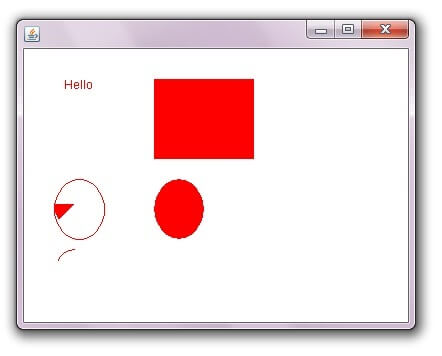
- import java.awt.*;
- import javax.swing.JFrame;
- public class DisplayGraphics extends Canvas{
- public void paint(Graphics g) {
- g.drawString("Hello",40,40);
- setBackground(Color.WHITE);
- g.fillRect(130, 30,100, 80);
- g.drawOval(30,130,50, 60);
- setForeground(Color.RED);
- g.fillOval(130,130,50, 60);
- g.drawArc(30, 200, 40,50,90,60);
- g.fillArc(30, 130, 40,50,180,40);
- }
- public static void main(String[] args) {
- DisplayGraphics m=new DisplayGraphics();
- JFrame f=new JFrame();
- f.add(m);
- f.setSize(400,400);
- //f.setLayout(null);
- f.setVisible(true);
- }
- }

 Posts
Posts


No comments:
Post a Comment