Featured Article

Thursday, 27 November 2014

Struts 2 Validation

Struts 2 Validation

To avoid the wrong values, we need to perform validation on forms where user submits some values. For 
example
 , if user writes his/her email id as abc, we need to give 
error message
 to the user that the given email id is not correct. So that we can have only valuable informations. There are three ways to perform validation in struts 2.
1) By Custom Validation Here, we must implement the Validateable interface (or extend ActionSupport class) and provide the implementation of validate method.
2) By Input Validation (built-in validators) Struts 2 provides a lot of predefined that can be used in struts 2 application to perform validation. 
Struts 2 provides following bundled validators.
  • requiredstring validator
  • stringlength validator
  • email validator
  • date validator
  • int validator
  • double validator
  • url validator
  • regex validator
3) By Ajax Validation (built-in validators with ajax) If we don't want to refresh the page, we can use jsonValidation interceptor to perform validation with ajax.

Wednesday, 19 November 2014

Struts 2 Architecture and Flow

Struts 2 Architecture and Flow

The architecture and flow of struts 2 application, is combined with many components such as Controller, ActionProxy, ActionMapper, Configuration Manager, ActionInvocation, Inerceptor, Action, Result etc. 
Here, we are going to understand 
the struts
 flow by 2 ways:
  1. struts 2 basic flow
  2. struts 2 standard architecture and flow provided by apache struts

Struts 2 basic flow

Let's try to understand the basic flow of struts 2 application by this simple figure: 
struts 2 basic flow
  1. User sends a request for the action
  2. Controller invokes the ActionInvocation
  3. ActionInvocation invokes each interceptors and action
  4. A result is generated
  5. The result is sent back to the ActionInvocation
  6. A HttpServletResponse is generated
  7. Response is sent to the user

Struts 2 standard flow (Struts 2 architecture)

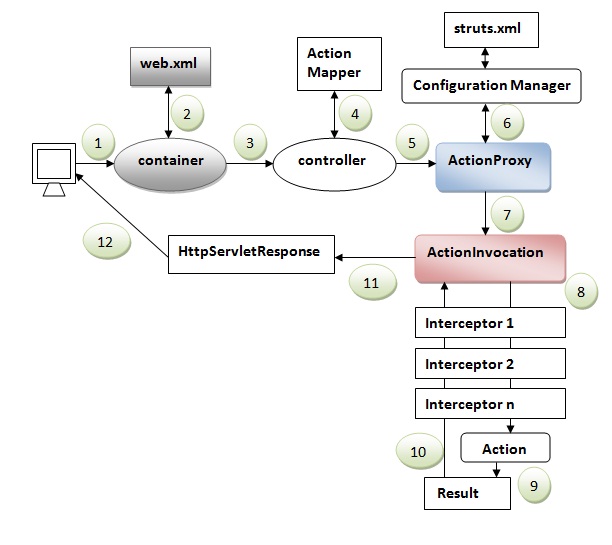
Let's try to understand the standard architecture of struts 2 application by this simple figure: 
struts 2 architecture
  1. User sends a request for the action
  2. Container maps the request in the web.xml file and gets the class name of controller.
  3. Container invokes the controller (StrutsPrepareAndExecuteFilter or FilterDispatcher). Since struts2.1, it is StrutsPrepareAndExecuteFilter. Before 2.1 it was FilterDispatcher.
  4. Controller gets the information for the action from the ActionMapper
  5. Controller invokes the ActionProxy
  6. ActionProxy gets the information of action and interceptor stack from the configuration manager which gets the information from the struts.xml file.
  7. ActionProxy forwards the request to the ActionInvocation
  8. ActionInvocation invokes each interceptors and action
  9. A result is generated
  10. The result is sent back to the ActionInvocation
  11. A HttpServletResponse is generated
  12. Response is sent to the user

Monday, 17 November 2014

Core Components of Struts ValueStack,OGNL,ActionInvocation

Struts 2 ValueStack Tutorial

A valueStack is simply a stack that contains application specific objects such as action objects and other model object.
At the execution time, action is placed on the top of the stack.
We can put objects in the valuestack, query it and delete it.

ValueStack Interface

The struts
 2 framework provides an interface to deal with valuestack. It provides many useful methods.

Methods of ValueStack interface

There are many methods in ValueStack interface. The commonly used methods are as follows: 
public String findString(String expr) finds the string by evaluating the given expression.
public Object findValue(String expr) finds the value by evaluating the specified expression.
public Object findValue(String expr, Class c) finds the value by evaluating the specified expression.
public Object peek() It returns the object located on the top of the stack.
public Object pop() It returns the object located on the top of the stack and removes it.
public void push(Object o) It puts the object on the top of the stack.
public void set(String key, Object value) It sets the object on the stack with the given key. It can be get by calling the findValue(key) method.
public int size() It returns the number of objects from the stack.


Struts 2 ActionContext

The ActionContext is a container of objects in which action is executed. The values stored in the ActionContext are unique per thread (i.e. ThreadLocal). So we don't need to make our action thread safe. 
We can get the reference of ActionContext by calling the getContext() method of ActionContext class. It is a static factory method. For example: 
  1. ActionContext context = ActionContext.getContext(); 


Struts 2 ActionInvocation

The ActionInvocation represents the execution state of an action. It holds the action and interceptors objects.

ActionInvocation Interface

The struts
 framework provides ActionInvocation interface to deal with ActionInvocation. It provides many methods, some of them can be used to get the instance of ValueStack, ActionProxy, ActionContext, Result etc.

Methods of ActionInvocation Interface

The commonly used methods of ActionInvocation interface are as follows:
No.MethodDescription
1)public ActionContext getInvocationContext()returns the ActionContext object associated with the ActionInvocation.
2)public ActionProxy getProxy()returns the ActionProxy instance holding this ActionInvocation.
3)public ValueStack getStack()returns the instance of ValueStack.
4)public Action getAction()returns the instance of Action associated with this ActionInvocation.
5)public void invoke()invokes the next resource in processing this ActionInvocation.
6)public Result getResult()returns the instance of Result.


Struts 2 OGNL

The Object Graph Navigation Language (OGNL) is an expression language. It simplifies the accessibility of data stored in the ActionContext.
The struts
 framework sets the ValueStack as the root object of OGNL. Notice that action object is pushed into the ValueStack. We can direct access the action property.
  1. <s:property value="username"/>  
Here, username is the property key.
The struts framework places other objects in ActionContext also e.g. map representing the requestsession,application scopes.
To get these values i.e. not the action property, we need to use # notation. For example to get the data from session scope, we need to use #session as given in the following example:
  1. <s:property name="#session.username"/>  
(or) <s:property name="#session['username']"/>

Friday, 14 November 2014

Struts 2 Interceptors

Struts 2 Interceptors Tutorial

Interceptor is an object that is invoked at the preprocessing and postprocessing of a request. In Struts 2, interceptor is used to perform operations such as validation, exception handling, internationalization, displaying intermediate result etc.

Advantage of interceptors

Pluggable If we need to remove any concern such as validation, exception handling, logging etc. from the application, we don't need to redeploy the application. We only need to remove the entry from 
struts.xml

Struts 2 default interceptors

There are many interceptors provided by struts 2 framework. We have option to create our own interceptors. The struts 2 default interceptors are as follows: 
1) alias It converts similar parameters that have different names between requests.
2) autowiring
3) chain If it is used with chain result type, it makes the properties of previous action available in the current action.
4) checkbox It is used to handle the check boxes in the form. By this, we can detect the unchecked checkboxes.
5) cookie It adds a cookie to the current action.
6) conversionError It adds conversion errors to the action's field errors.
7) createSession It creates and HttpSession object if it doesn't exists.
8) clearSession It unbinds the HttpSession object.
9) debugging It provides support of debugging.
10) externalRef
11) execAndWait It sends an intermediate waiting page for the result.
12) exception It maps exception to a result. 
13) fileUpload It provides support to file upload in struts 2.
14) i18n It provides support to internationalization and localization.
15) jsonValidation It provides support to asynchronous validation.
16) logger It outputs the action name.
17) store It stores and retrieves action messages, action errors or field errors for action that implements ValidationAware interface.
18) modelDriven It makes other model object as the default object of valuestack.
19) scopedModelDriven It is similar to ModelDriven but works for action that implements ScopedModelDriven.
20) params It populates the action properties with the request parameters.
21) actionMappingParams
22) prepare It performs preparation logic if action implements Preparable interface.
23) profiling It supports action profiling.
24) roles It supports role-based action.
25) scope It is used to store the action state in the session or application scope.
26) servletConfig It provides access to maps representing HttpServletRequest and HttpServletResponse.
27) sessionAutowiring
28) staticParams It maps static properties to action properties.
29) timer It outputs the time needed to execute an action.
30) token It prevents duplication submission of request.
31) tokenSession It prevents duplication submission of request.
32) validation It provides support to input validation.
33) workflow It calls the validate method of action class if action class implements Validateable interface.
34) annotationWorkflow
35) multiselect

Monday, 10 November 2014

Struts 2


Struts 2 Tutorial

struts 2 frameworkThe struts 2 framework is used to develop MVC-based web application.
The struts framework was initially created by Craig McClanahan and donated to Apache Foundation in May, 2000 and Struts 1.0 was released in June 2001.
The current stable release of Struts is 2.3.15.1 GA in July 16, 2013.
This struts 2 tutorial covers all the topics of Struts 2 Framework with simplified examples for beginners and experienced persons.

Struts 2 Framework

The Struts 2 framework is used to develop MVC (Model View Controller) based web applications. Struts 2 is the combination of webwork framework of opensymphony and struts 1.
  1. struts2 = webwork + struts1  
The Struts 2 provides supports to POJO based actions, Validation Support, AJAX Support, Integration support to various frameworks such as Hibernate, Spring, Tiles etc, support to various result types such as Freemarker, Velocity, JSP etc.

Struts 2 Features Tutorial

Struts 2 provides many features that were not in struts 1. The important features of struts 2 framework are as follows:
  1. Configurable MVC components
  2. POJO based actions
  3. AJAX support
  4. Integration support
  5. Various Result Types
  6. Various Tag support
  7. Theme and Template support

1) Configurable MVC components

In struts 2 framework, we provide all the components (view components and action) information in struts.xml file. If we need to change any information, we can simply change it in the xml file.

2) POJO based actions

In struts 2, action class is POJO (Plain Old Java Object) i.e. a simple java class. Here, you are not forced to implement any interface or inherit any class.

3) AJAX support

Struts 2 provides support to ajax technology. It is used to make asynchronous request i.e. it doesn't block the user. It sends only required field data to the server side not all. So it makes the performance fast.

4) Integration Support

We can simply integrate the struts 2 application with hibernate, spring, tiles etc. frameworks.

5) Various Result Types

We can use JSP, freemarker, velocity etc. technologies as the result in struts 2.

6) Various Tag support

Struts 2 provides various types of tags such as UI tags, Data tags, control tags etc to ease the development of struts 2 application.

7) Theme and Template support

Struts 2 provides three types of theme support: xhtml, simple and css_xhtml. The xhtml is default theme of struts 2. Themes and templates can be used for common look and feel.


Model 1 and Model 2 (MVC) Architecture

Before developing the web applications, we need to have idea about design models. There are two types of programming models (design models)
  1. Model 1 Architecture
  2. Model 2 (MVC) Architecture

Model 1 Architecture

Servlet and JSP are the main technologies to develop the web applications.
Servlet was considered superior to CGI. Servlet technology doesn't create process, rather it creates thread to handle request. The advantage of creating thread over process is that it doesn't allocate separate memory area. Thus many subsequent requests can be easily handled by servlet.
Problem in Servlet technology Servlet needs to recompile if any designing code is modified. It doesn't provide separation of concern. Presentation and Business logic are mixed up.
JSP overcomes almost all the problems of Servlet. It provides better separation of concern, now presentation and business logic can be easily separated. You don't need to redeploy the application if JSP page is modified. JSP provides support to develop web application using JavaBean, custom tags and JSTL so that we can put the business logic separate from our JSP that will be easier to test and debug.
model 1 architecture As you can see in the above figure, there is picture which show the flow of the model1 architecture.
  1. Browser sends request for the JSP page
  2. JSP accesses Java Bean and invokes business logic
  3. Java Bean connects to the database and get/save data
  4. Response is sent to the browser which is generated by JSP

Advantage of Model 1 Architecture

  • Easy and Quick to develop web application

Disadvantage of Model 1 Architecture

  • Navigation control is decentralized since every page contains the logic to determine the next page. If JSP page name is changed that is referred by other pages, we need to change it in all the pages that leads to the maintenance problem.
  • Time consuming You need to spend more time to develop custom tags in JSP. So that we don't need to use scriptlet tag.
  • Hard to extend It is better for small applications but not for large applications.

Model 2 (MVC) Architecture

Model 2 is based on the MVC (Model View Controller) design pattern. The MVC design pattern consists of three modules model, view and controller.
Model The model represents the state (data) and business logic of the application.
View The view module is responsible to display data i.e. it represents the presentation.
Controller The controller module acts as an interface between view and model. It intercepts all the requests i.e. receives input and commands to Model / View to change accordingly.
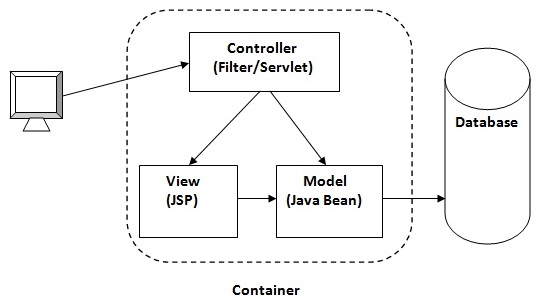
mvc architecture

Advantage of Model 2 (MVC) Architecture

  • Navigation control is centralized Now only controller contains the logic to determine the next page.
  • Easy to maintain
  • Easy to extend
  • Easy to test
  • Better separation of concerns

Disadvantage of Model 2 (MVC) Architecture

  • We need to write the controller code self. If we change the controller code, we need to recompile the class and redeploy the application.


Solution of Model 2 Architecture: Configurable MVC Components

It uses the declarative approach for defining view components, request mapping etc. It resolves the problem of Model 2 architecture. The Struts framework provides the configurable MVC support. In struts 2, we define all the action classes and view components in struts.xml file.

Steps to create Struts 2 Application Example

  1. Create the directory structure
  2. Create input page (index.jsp)
  3. Provide the entry of Controller in (web.xml) file
  4. Create the action class (Product.java)
  5. Map the request with the action in (struts.xml) file and define the view components
  6. Create view components (welcome.jsp)
  7. load the jar files
  8. start server and deploy the project

1) Create the directory structure

The directory structure of struts 2 is same as servlet/JSP. Here, struts.xml file must be located in the classes folder.
directory structure of struts 2 application

2) Create input page (index.jsp)

This jsp page creates a form using struts UI tags. To use the struts UI tags, you need to specify uri /struts-tags. Here, we have used s:form to create a form, s:textfield to create a text field, s:submit to create a submit button.
index.jsp
  1. <%@ taglib uri="/struts-tags" prefix="s" %>  
  2. <s:form action="product">  
  3. <s:textfield name="id" label="Product Id"></s:textfield>  
  4. <s:textfield name="name" label="Product Name"></s:textfield>  
  5. <s:textfield name="price" label="Product Price"></s:textfield>  
  6. <s:submit value="save"></s:submit>  
  7. </s:form>  

3) Provide the entry of Controller in (web.xml) file

In struts 2, StrutsPrepareAndExecuteFilter class works as the controller. As we know well, struts 2 uses filter for the controller. It is implicitly provided by the struts framework.
web.xml
  1. <?xml version="1.0" encoding="UTF-8"?>  
  2. <web-app>  
  3.   <filter>  
  4.   <filter-name>struts2</filter-name>  
  5.    <filter-class>  
  6.     org.apache.struts2.dispatcher.ng.filter.StrutsPrepareAndExecuteFilter  
  7.    </filter-class>  
  8.   </filter>  
  9.   <filter-mapping>  
  10.    <filter-name>struts2</filter-name>  
  11.     <url-pattern>/*</url-pattern>  
  12.   </filter-mapping>  
  13. </web-app>  

4) Create the action class (Product.java)

This is simple bean class. In struts 2, action is POJO (Plain Old Java Object). It has one extra method execute i.e. invoked by struts framework by default.
Product.java
  1. package com.javatpoint;  
  2.   
  3. public class Product {  
  4. private int id;  
  5. private String name;  
  6. private float price;  
  7. public int getId() {  
  8.     return id;  
  9. }  
  10. public void setId(int id) {  
  11.     this.id = id;  
  12. }  
  13. public String getName() {  
  14.     return name;  
  15. }  
  16. public void setName(String name) {  
  17.     this.name = name;  
  18. }  
  19. public float getPrice() {  
  20.     return price;  
  21. }  
  22. public void setPrice(float price) {  
  23.     this.price = price;  
  24. }  
  25.   
  26. public String execute(){  
  27.     return "success";  
  28. }  
  29. }  

5) Map the request in (struts.xml) file and define the view components

It is the important file from where struts framework gets information about the action and decides which result to be invoked. Here, we have used many elements such as struts, package, action and result.
struts element is the root elements of this file. It represents an application.
package element is the sub element of struts. It represents a module of the application. It generally extends thestruts-default package where many interceptors and result types are defined.
action element is the sub element of package. It represents an action to be invoked for the incoming request. It has name, class and method attributes. If you don't specify name attribute by default execute() method will be invoked for the specified action class.
result element is the sub element of action. It represents an view (result) that will be invoked. Struts framework checks the string returned by the action class, if it returns success, result page for the action is invoked whose name is success or has no name. It has name and type attributes. Both are optional. If you don't specify the result name, by default success is assumed as the result name. If you don't specify the type attribute, by default dispatcher is considered as the default result type. We will learn about result types later.
struts.xml
  1. <?xml version="1.0" encoding="UTF-8" ?>  
  2. <!DOCTYPE struts PUBLIC "-//Apache Software Foundation//DTD Struts  
  3. Configuration 2.1//EN" "http://struts.apache.org/dtds/struts-2.1.dtd">  
  4. <struts>  
  5. <package name="default" extends="struts-default">  
  6.   
  7. <action name="product" class="com.javatpoint.Product">  
  8. <result name="success">welcome.jsp</result>  
  9. </action>  
  10.   
  11. </package>  
  12. </struts>      

6) Create view components (welcome.jsp)

It is the view component the displays information of the action. Here, we are using struts tags to get the information.
The s:property tag returns the value for the given name, stored in the action object.
welcome.jsp
  1. <%@ taglib uri="/struts-tags" prefix="s" %>  
  2.   
  3. Product Id:<s:property value="id"/><br/>  
  4. Product Name:<s:property value="name"/><br/>  
  5. Product Price:<s:property value="price"/><br/>  

7) Load the jar files

To run this application, you need to have the struts 2 jar files. Here, we are providing all the necessary jar files for struts 2. Download it and put these jar files in the lib folder of your project.

8) start server and deploy the project

Finally, start the server and deploy the project and access it.
struts 2 example output
struts 2 example

To simply create the struts application, you may now use IDE such as eclipse, myeclipse, netbeans, RAD, JDeveloper etc.

JSP (Java Server Pages)

JSP (Java Server Pages)

jsp tutorial with example
JSP technology is used to create web application just like Servlet technology. It can be thought of as an extension to servlet because it provides more functionality than servlet such as expression language, jstl etc.
A JSP page consists of HTML tags and JSP tags. The jsp pages are easier to maintain than servlet because we can separate designing and development. It provides some additional features such as Expression Language, Custom Tag etc.

Advantage of JSP over Servlet

There are many advantages of JSP over servlet. They are as follows:

1) Extension to Servlet

JSP technology is the extension to servlet technology. We can use all the features of servlet in JSP. In addition to, we can use implicit objects, predefined tags, expression language and Custom tags in JSP, that makes JSP development easy.

2) Easy to maintain

JSP can be easily managed because we can easily separate our business logic with presentation logic. In servlet technology, we mix our business logic with the presentation logic.

3) Fast Development: No need to recompile and redeploy

If JSP page is modified, we don't need to recompile and redeploy the project. The servlet code needs to be updated and recompiled if we have to change the look and feel of the application.

4) Less code than Servlet

In JSP, we can use a lot of tags such as action tags, jstl, custom tags etc. that reduces the code. Moreover, we can use EL, implicit objects etc.

Life cycle of a JSP Page

The JSP pages follows these phases:
  • Translation of JSP Page
  • Compilation of JSP Page
  • Classloading (class file is loaded by the classloader)
  • Instantiation (Object of the Generated Servlet is created).
  • Initialization ( jspInit() method is invoked by the container).
  • Reqeust processing ( _jspService() method is invoked by the container).
  • Destroy ( jspDestroy() method is invoked by the container).

Note: jspInit(), _jspService() and jspDestroy() are the life cycle methods of JSP.

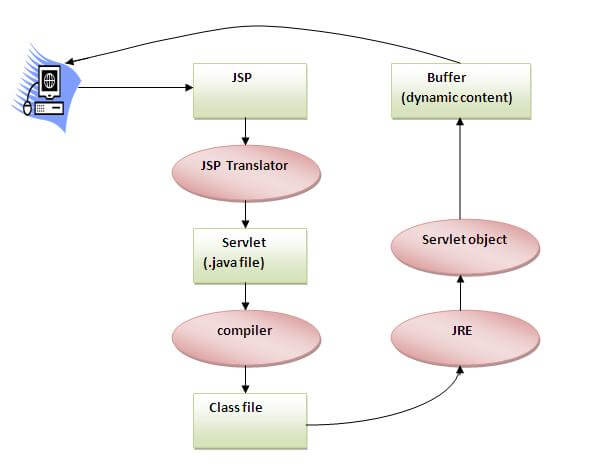
how JSP is converted into servlet
As depicted in the above diagram, JSP page is translated into servlet by the help of JSP translator. The JSP translator is a part of webserver that is responsible to translate the JSP page into servlet. Afterthat Servlet page is compiled by the compiler and gets converted into the class file. Moreover, all the processes that happens in servlet is performed on JSP later like initialization, committing response to the browser and destroy.

Creating a simple JSP Page

To create the first jsp page, write some html code as given below, and save it by .jsp extension. We have save this file as index.jsp. Put it in a folder and paste the folder in the web-apps directory in apache tomcat to run the jsp page.
index.jsp
Let's see the simple example of JSP, here we are using the scriptlet tag to put java code in the JSP page. We will learn scriptlet tag later.
  1. <html>  
  2. <body>  
  3. <% out.print(2*5); %>  
  4. </body>  
  5. </html>  
It will print 10 on the browser.

How to run a simple JSP Page ?

Follow the following steps to execute this JSP page:
  • Start the server
  • put the jsp file in a folder and deploy on the server
  • visit the browser by the url http://localhost:portno/contextRoot/jspfile e.g. http://localhost:8888/myapplication/index.jsp

Do I need to follow directory structure to run a simple JSP ?

No, there is no need of directory structure if you don't have class files or tld files. For example, put jsp files in a folder directly and deploy that folder.It will be running fine.But if you are using bean class, Servlet or tld file then directory structure is required.

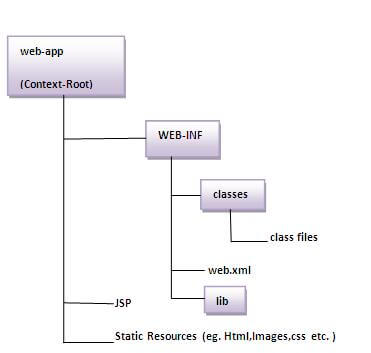
Directory structure of JSP

The directory structure of JSP page is same as servlet. We contains the jsp page outside the WEB-INF folder or in any directory.
directory structure of jsp

The JSP API

The JSP API consists of two packages:
  1. javax.servlet.jsp
  2. javax.servlet.jsp.tagext

javax.servlet.jsp package

The javax.servlet.jsp package has two interfaces and classes.The two interfaces are as follows:
  1. JspPage
  2. HttpJspPage
The classes are as follows:
  • JspWriter
  • PageContext
  • JspFactory
  • JspEngineInfo
  • JspException
  • JspError

The JspPage interface

According to the JSP specification, all the generated servlet classes must implement the JspPage interface. It extends the Servlet interface. It provides two life cycle methods.
JSP API

Methods of JspPage interface

  1. public void jspInit(): It is invoked only once during the life cycle of the JSP when JSP page is requested firstly. It is used to perform initialization. It is same as the init() method of Servlet interface.
  2. public void jspDestroy(): It is invoked only once during the life cycle of the JSP before the JSP page is destroyed. It can be used to perform some clean up operation.

The HttpJspPage interface

The HttpJspPage interface provides the one life cycle method of JSP. It extends the JspPage interface.

Method of HttpJspPage interface:

  1. public void _jspService(): It is invoked each time when request for the JSP page comes to the container. It is used to process the request. The underscore _ signifies that you cannot override this method.

JSP Scriptlet tag (Scripting elements)


In JSP, java code can be written inside the jsp page using the scriptlet tag. Let's see what are the scripting elements first.

Scripting elements

The scripting elements provides the ability to insert java code inside the jsp. There are three types of scripting elements:
  • scriptlet tag
  • expression tag
  • declaration tag

JSP scriptlet tag

A scriptlet tag is used to execute java source code in JSP. Syntax is as follows:
  1. <%  java source code %>  

Simple Example of JSP scriptlet tag

In this example, we are displaying a welcome message.
  1. <html>  
  2. <body>  
  3. <% out.print("welcome to jsp"); %>  
  4. </body>  
  5. </html>  

Example of JSP scriptlet tag that prints the user name

In this example, we have created two files index.html and welcome.jsp. The index.html file gets the username from the user and the welcome.jsp file prints the username with the welcome message.

index.html

  1. <html>  
  2. <body>  
  3. <form action="welcome.jsp">  
  4. <input type="text" name="uname">  
  5. <input type="submit" value="go"><br/>  
  6. </form>  
  7. </body>  
  8. </html>  

welcome.jsp

  1. <html>  
  2. <body>  
  3. <%  
  4. String name=request.getParameter("uname");  
  5. out.print("welcome "+name);  
  6. %>  
  7. </form>  
  8. </body>  
  9. </html>  

JSP expression tag


The code placed within expression tag is written to the output stream of the response. So you need not write out.print() to write data. It is mainly used to print the values of variable or method.

Syntax of JSP expression tag

  1. <%=  statement %>  

Example of JSP expression tag

In this example of jsp expression tag, we are simply displaying a welcome message.
  1. <html>  
  2. <body>  
  3. <%= "welcome to jsp" %>  
  4. </body>  
  5.   
  6. </html>  

Note: Do not end your statement with semicolon in case of expression tag.


Example of JSP expression tag that prints current time

To display the current time, we have used the getTime() method of Calendar class. The getTime() is an instance method of Calendar class, so we have called it after getting the instance of Calendar class by the getInstance() method.

index.jsp

  1. <html>  
  2. <body>  
  3. Current Time: <%= java.util.Calendar.getInstance().getTime() %>  
  4. </body>  
  5. </html>  

Example of JSP expression tag that prints the user name

In this example, we are printing the username using the expression tag. The index.html file gets the username and sends the request to the welcome.jsp file, which displays the username.

index.html

  1. <html>  
  2. <body>  
  3.   
  4. <form action="welcome.jsp">  
  5. <input type="text" name="uname"><br/>  
  6. <input type="submit" value="go">  
  7. </form>  
  8. </body>  
  9. </html>  

welcome.jsp

  1. <html>  
  2. <body>  
  3. <%= "Welcome "+request.getParameter("uname") %>  
  4. </form>  
  5. </body>  
  6. </html>  

JSP Declaration Tag

The JSP declaration tag is used to declare fields and methods.
The code written inside the jsp declaration tag is placed outside the service() method of auto generated servlet.
So it doesn't get memory at each request.

Syntax of JSP declaration tag

The syntax of the declaration tag is as follows:
  1. <%!  field or method declaration %>  

Difference between the jsp scriptlet tag and jsp declaration tag ?

Jsp Scriptlet TagJsp Declaration Tag
The jsp scriptlet tag can only declare variables not methods.The jsp declaration tag can declare variables as well as methods.
The declaration of scriptlet tag is placed inside the _jspService() method.The declaration of jsp declaration tag is placed outside the _jspService() method.

Example of JSP declaration tag that declares field

In this example of JSP declaration tag, we are declaring the field and printing the value of the declared field using the jsp expression tag.

index.jsp

  1. <html>  
  2. <body>  
  3.   
  4. <%! int data=50; %>  
  5. <%= "Value of the variable is:"+data %>  
  6.   
  7. </body>  
  8. </html>  

Example of JSP declaration tag that declares method

In this example of JSP declaration tag, we are defining the method which returns the cube of given number and calling this method from the jsp expression tag. But we can also use jsp scriptlet tag to call the declared method.

index.jsp

  1. <html>  
  2. <body>  
  3.   
  4. <%!   
  5. int cube(int n){  
  6. return n*n*n*;  
  7. }  
  8. %>  
  9.   
  10. <%= "Cube of 3 is:"+cube(3) %>  
  11.   
  12. </body>  
  13. </html>  

JSP directives


There are three types of directives:The jsp directives are messages that tells the web container how to translate a JSP page into the corresponding servlet.
  • page directive
  • include directive
  • taglib directive

Syntax of JSP Directive

  1. <%@ directive attribute="value" %>  


JSP page directive

The page directive defines attributes that apply to an entire JSP page.

Syntax of JSP page directive

  1. <%@ page attribute="value" %>  

Attributes of JSP page directive

  • import
  • contentType
  • extends
  • info
  • buffer
  • language
  • isELIgnored
  • isThreadSafe
  • autoFlush
  • session
  • pageEncoding
  • errorPage
  • isErrorPage


1)import

The import attribute is used to import class,interface or all the members of a package.It is similar to import keyword in java class or interface.

Example of import attribute

  1. <html>  
  2. <body>  
  3.   
  4. <%@ page import="java.util.Date" %>  
  5. Today is: <%= new Date() %>  
  6.   
  7. </body>  
  8. </html>  


2)contentType

The contentType attribute defines the MIME(Multipurpose Internet Mail Extension) type of the HTTP response.The default value is "text/html;charset=ISO-8859-1".

Example of contentType attribute

  1. <html>  
  2. <body>  
  3.   
  4. <%@ page contentType=application/msword %>  
  5. Today is: <%= new java.util.Date() %>  
  6.   
  7. </body>  
  8. </html>  


3)extends

The extends attribute defines the parent class that will be inherited by the generated servlet.It is rarely used.


4)info

This attribute simply sets the information of the JSP page which is retrieved later by using getServletInfo() method of Servlet interface.

Example of info attribute

  1. <html>  
  2. <body>  
  3.   
  4. <%@ page info="composed by Sonoo Jaiswal" %>  
  5. Today is: <%= new java.util.Date() %>  
  6.   
  7. </body>  
  8. </html>  
The web container will create a method getServletInfo() in the resulting servlet.For example:
  1. public String getServletInfo() {  
  2.   return "composed by Sonoo Jaiswal";   
  3. }  


5)buffer

The buffer attribute sets the buffer size in kilobytes to handle output generated by the JSP page.The default size of the buffer is 8Kb.

Example of buffer attribute

  1. <html>  
  2. <body>  
  3.   
  4. <%@ page buffer="16kb" %>  
  5. Today is: <%= new java.util.Date() %>  
  6.   
  7. </body>  
  8. </html>  


6)language

The language attribute specifies the scripting language used in the JSP page. The default value is "java".


7)isELIgnored

We can ignore the Expression Language (EL) in jsp by the isELIgnored attribute. By default its value is false i.e. Expression Language is enabled by default. We see Expression Language later.
  1. <%@ page isELIgnored="true" %>//Now EL will be ignored  


8)isThreadSafe

Servlet and JSP both are multithreaded.If you want to control this behaviour of JSP page, you can use isThreadSafe attribute of page directive.The value of isThreadSafe value is true.If you make it false, the web container will serialize the multiple requests, i.e. it will wait until the JSP finishes responding to a request before passing another request to it.If you make the value of isThreadSafe attribute like:
<%@ page isThreadSafe="false" %>
The web container in such a case, will generate the servlet as:
  1. public class SimplePage_jsp extends HttpJspBase   
  2.   implements SingleThreadModel{  
  3. .......  
  4. }  


9)errorPage

The errorPage attribute is used to define the error page, if exception occurs in the current page, it will be redirected to the error page.

Example of errorPage attribute

  1. //index.jsp  
  2. <html>  
  3. <body>  
  4.   
  5. <%@ page errorPage="myerrorpage.jsp" %>  
  6.   
  7.  <%= 100/0 %>  
  8.   
  9. </body>  
  10. </html>  


10)isErrorPage

The isErrorPage attribute is used to declare that the current page is the error page.

Note: The exception object can only be used in the error page.

Example of isErrorPage attribute

  1. //myerrorpage.jsp  
  2. <html>  
  3. <body>  
  4.   
  5. <%@ page isErrorPage="true" %>  
  6.   
  7.  Sorry an exception occured!<br/>  
  8. The exception is: <%= exception %>  
  9.   
  10. </body>  
  11. </html>  

Jsp Include Directive


Advantage of Include directive
The include directive is used to include the contents of any resource it may be jsp file, html file or text file. The include directive includes the original content of the included resource at page translation time (the jsp page is translated only once so it will be better to include static resource).
Code Reusability

Syntax of include directive

  1. <%@ include file="resourceName" %>  

Example of include directive

In this example, we are including the content of the header.html file. To run this example you must create an header.html file.
  1. <html>  
  2. <body>  
  3.   
  4. <%@ include file="header.html" %>  
  5.   
  6. Today is: <%= java.util.Calendar.getInstance().getTime() %>  
  7.   
  8. </body>  
  9. </html>  

Note: The include directive includes the original content, so the actual page size grows at runtime.

JSP Taglib directive


Syntax JSP Taglib directive 
The JSP taglib directive is used to define a tag library that defines many tags. We use the TLD (Tag Library Descriptor) file to define the tags. In the custom tag section we will use this tag so it will be better to learn it in custom tag.
  1. <%@ taglib uri="uriofthetaglibrary" prefix="prefixoftaglibrary" %>  


Example of JSP Taglib directive

In this example, we are using our tag named currentDate. To use this tag we must specify the taglib directive so the container may get information about the tag.
  1. <html>  
  2. <body>  
  3.   
  4. <%@ taglib uri="http://www.javatpoint.com/tags" prefix="mytag" %>  
  5.   
  6. <mytag:currentDate/>  
  7.   
  8. </body>  
  9. </html>