.jpg)
Servlet

Servlet technology is used to create web application (resides at server side and generates dynamic web page).
Servet technology is robust and scalable as it uses the java language. Before Servlet, CGI (Common Gateway Interface) scripting language was used as a server-side programming language. But there were many disadvantages of this technology. We have discussed these disadvantages below.
There are many interfaces and classes in the servlet API such as Servlet, GenericServlet, HttpServlet, ServletRequest, ServletResponse etc.
What is a Servlet?
Servlet can be described in many ways, depending on the context.
- Servlet is a technology i.e. used to create web application.
- Servlet is an API that provides many interfaces and classes including documentations.
- Servlet is an interface that must be implemented for creating any servlet.
- Servlet is a class that extend the capabilities of the servers and respond to the incoming request. It can respond to any type of requests.
- Servlet is a web component that is deployed on the server to create dynamic web page.
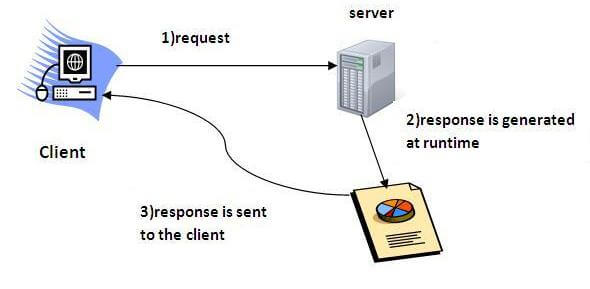
What is web application?
A web application is an application accessible from the web. A web application is composed of web components like Servlet, JSP, Filter etc. and other components such as HTML. The web components typically execute in Web Server and respond to HTTP request.
CGI(Commmon Gateway Interface)
CGI technology enables the web server to call an external program and pass HTTP request information to the external program to process the request. For each request, it starts a new process.
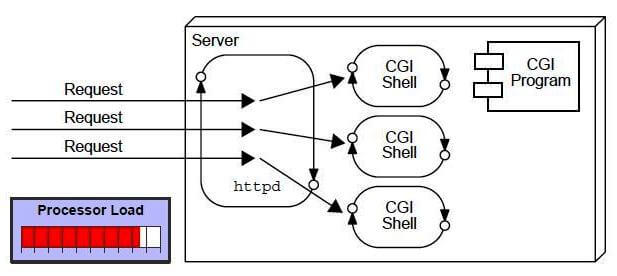
Disadvantages of CGI
There are many problems in CGI technology:
- If number of clients increases, it takes more time for sending response.
- For each request, it starts a process and Web server is limited to start processes.
- It uses platform dependent language e.g. C, C++, perl.
Advantage of Servlet
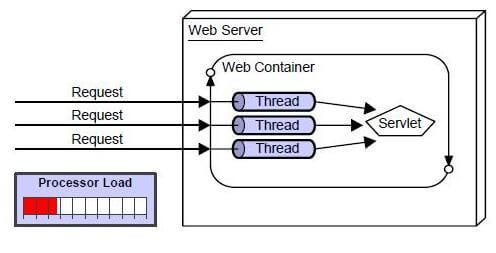
There are many advantages of Servlet over CGI. The web container creates threads for handling the multiple requests to the servlet. Threads have a lot of benefits over the Processes such as they share a common memory area, lighweight, cost of communication between the threads are low. The basic benefits of servlet are as follows:
- better performance: because it creates a thread for each request not process.
- Portability: because it uses java language.
- Robust: Servlets are managed by JVM so no need to worry about momory leak, garbage collection etc.
- Secure: because it uses java language..
Servlet Terminology
The basic terminology used in servlet are given below:There are some key points that must be known by the servlet programmer like server, container, get request, post request etc. Let's first discuss these points before starting the servlet technology.- HTTP
- HTTP Request Types
- Difference between Get and Post method
- Container
- Server and Difference between web server and application server
- Content Type
- Introduction of XML
- Deployment
HTTP (Hyper Text Transfer Protocol)
- Http is the protocol that allows web servers and browsers to exchange data over the web.
- It is a request response protocol.
- Http uses reliable TCP connections bydefault on TCP port 80.
- It is stateless means each request is considered as the new request. In other words, server doesn't recognize the user bydefault.

Http Request Methods
Every request has a header that tells the status of the client. There are many request methods. Get and Post requests are mostly used.The http request methods are:- GET
- POST
- HEAD
- PUT
- DELETE
- OPTIONS
- TRACE
HTTP Request Description GET Asks to get the resource at the requested URL. POST Asks the server to accept the body info attached. It is like GET request with extra info sent with the request. HEAD Asks for only the header part of whatever a GET would return. Just like GET but with no body. TRACE Asks for the loopback of the request message, for testing or troubleshooting. PUT Says to put the enclosed info (the body) at the requested URL. DELETE Says to delete the resource at the requested URL. OPTIONS Asks for a list of the HTTP methods to which the thing at the request URL can respond
What is the difference between Get and Post?
There are many differences between the Get and Post request. Let's see these differences:GET POST 1) In case of Get request, only limited
amount of datacan be sent because data
is sent in header.In case of post request, large
amount of data can be sent
because data is
sent in body.2) Get request is not secured because data is
exposed in URL bar.Post request is secured because
data is not exposed in URL bar.3) Get request can be bookmarked Post request cannot be bookmarked 4) Get request is idempotent. It means second
request will be ignored until response of first
request is delivered.Post request is non-idempotent 5) Get request is more efficient and used
more than PostPost request is less efficient
and used less than get.
Anatomy of Get Request
As we know that data is sent in request header in case of get request. It is the default request type. Let's see what informations are sent to the server.
Anatomy of Post Request
As we know, in case of post request original data is sent in message body. Let's see how informations are passed to the server in case of post request.
Container
It provides runtime environment for JavaEE (j2ee) applications.It performs many operations that are given below:- Life Cycle Management
- Multithreaded support
- Object Pooling
- Security etc.
Server
It is a running program or software that provides services.There are two types of servers:- Web Server
- Application Server
Web Server
Web server contains only web or servlet container. It can be used for servlet, jsp, struts, jsf etc. It can't be used for EJB.Example of Web Servers are: Apache Tomcat and Resin.
Application Server
Application server contains Web and EJB containers. It can be used for servlet, jsp, struts, jsf, ejb etc.Example of Application Servers are:- JBoss Open-source server from JBoss community.
- Glassfish provided by Sun Microsystem. Now acquired by Oracle.
- Weblogic provided by Oracle. It more secured.
- Websphere provided by IBM.
Content Type
Content Type is also known as MIME (Multipurpose internet Mail Extension) Type. It is a HTTP header that provides the description about what are you sending to the browser.There are many content types:- text/html
- text/plain
- application/msword
- application/vnd.ms-excel
- application/jar
- application/pdf
- application/octet-stream
- application/x-zip
- images/jpeg
- video/quicktime etc.
Servlet API
The javax.servlet package contains many interfaces and classes that are used by the servlet or web container. These are not specific to any protocol.The javax.servlet and javax.servlet.http packages represent interfaces and classes for servlet api.The javax.servlet.http package contains interfaces and classes that are responsible for http requests only.Let's see what are the interfaces of javax.servlet package.Interfaces in javax.servlet package
There are many interfaces in javax.servlet package. They are as follows:- Servlet
- ServletRequest
- ServletResponse
- RequestDispatcher
- ServletConfig
- ServletContext
- SingleThreadModel
- Filter
- FilterConfig
- FilterChain
- ServletRequestListener
- ServletRequestAttributeListener
- ServletContextListener
- ServletContextAttributeListener
Classes in javax.servlet package
There are many classes in javax.servlet package. They are as follows:- GenericServlet
- ServletInputStream
- ServletOutputStream
- ServletRequestWrapper
- ServletResponseWrapper
- ServletRequestEvent
- ServletContextEvent
- ServletRequestAttributeEvent
- ServletContextAttributeEvent
- ServletException
- UnavailableException
Interfaces in javax.servlet.http package
There are many interfaces in javax.servlet.http package. They are as follows:- HttpServletRequest
- HttpServletResponse
- HttpSession
- HttpSessionListener
- HttpSessionAttributeListener
- HttpSessionBindingListener
- HttpSessionActivationListener
- HttpSessionContext (deprecated now)
Classes in javax.servlet.http package
There are many classes in javax.servlet.http package. They are as follows:- HttpServlet
- Cookie
- HttpServletRequestWrapper
- HttpServletResponseWrapper
- HttpSessionEvent
- HttpSessionBindingEvent
- HttpUtils (deprecated now)
Servlet Interface
Servlet interface needs to be implemented for creating any servlet (either directly or indirectly). It provides 3 life cycle methods that are used to initialize the servlet, to service the requests, and to destroy the servlet and 2 non-life cycle methods.Servlet interface provides common behaviour to all the servlets.Methods of Servlet interface
There are 5 methods in Servlet interface. The init, service and destroy are the life cycle methods of servlet. These are invoked by the web container.- Method
Description public void init(ServletConfig config) initializes the servlet. It is the life cycle
method of servlet and invoked by the
web container only once.public void service(ServletRequest request,ServletResponse response) provides response for the incoming
request. It is invoked at each request by the web container.public void destroy() is invoked only once and indicates
that servlet is being destroyed.public ServletConfig getServletConfig() returns the object of ServletConfig. public String getServletInfo() returns information about servlet
such as writer, copyright, version etc.
Servlet Example by implementing Servlet interface
Let's see the simple example of servlet by implementing the servlet interface.It will be better if you learn it after visiting steps to create a servlet.
File: First.java- import java.io.*;
- import javax.servlet.*;
- public class First implements Servlet{
- ServletConfig config=null;
- public void init(ServletConfig config){
- this.config=config;
- System.out.println("servlet is initialized");
- }
- public void service(ServletRequest req,ServletResponse res)
- throws IOException,ServletException{
- res.setContentType("text/html");
- PrintWriter out=res.getWriter();
- out.print("<html><body>");
- out.print("<b>hello simple servlet</b>");
- out.print("</body></html>");
- }
- public void destroy(){System.out.println("servlet is destroyed");}
- public ServletConfig getServletConfig(){return config;}
- public String getServletInfo(){return "copyright 2007-1010";}
- }
GenericServlet class
GenericServlet class can handle any type of request so it is protocol-independent.GenericServlet class implements Servlet,ServletConfig and Serializable interfaces. It provides the implementaion of all the methods of these interfaces except the service method.You may create a generic servlet by inheriting the GenericServlet class and providing the implementation of the service method.Methods of GenericServlet class
There are many methods in GenericServlet class. They are as follows:- public void init(ServletConfig config) is used to initialize the servlet.
- public abstract void service(ServletRequest request, ServletResponse response) provides service for the incoming request. It is invoked at each time when user requests for a servlet.
- public void destroy() is invoked only once throughout the life cycle and indicates that servlet is being destroyed.
- public ServletConfig getServletConfig() returns the object of ServletConfig.
- public String getServletInfo() returns information about servlet such as writer, copyright, version etc.
- public void init() it is a convenient method for the servlet programmers, now there is no need to call super.init(config)
- public ServletContext getServletContext() returns the object of ServletContext.
- public String getInitParameter(String name) returns the parameter value for the given parameter name.
- public Enumeration getInitParameterNames() returns all the parameters defined in the web.xml file.
- public String getServletName() returns the name of the servlet object.
- public void log(String msg) writes the given message in the servlet log file.
- public void log(String msg,Throwable t) writes the explanatory message in the servlet log file and a stack trace.
Servlet Example by inheriting the GenericServlet class
Let's see the simple example of servlet by inheriting the GenericServlet class.It will be better if you learn it after visiting steps to create a servlet.
File: First.java- import java.io.*;
- import javax.servlet.*;
- public class First extends GenericServlet{
- public void service(ServletRequest req,ServletResponse res)
- throws IOException,ServletException{
- res.setContentType("text/html");
- PrintWriter out=res.getWriter();
- out.print("<html><body>");
- out.print("<b>hello generic servlet</b>");
- out.print("</body></html>");
- }
- }
HttpServlet class
Methods of HttpServlet classThe HttpServlet class extends the GenericServlet class and implements Serializable interface. It provides http specific methods such as doGet, doPost, doHead, doTrace etc. There are many methods in HttpServlet class. They are as follows:- public void service(ServletRequest req,ServletResponse res) dispatches the request to the protected service method by converting the request and response object into http type.
- protected void service(HttpServletRequest req, HttpServletResponse res) receives the request from the service method, and dispatches the request to the doXXX() method depending on the incoming http request type.
- protected void doGet(HttpServletRequest req, HttpServletResponse res) handles the GET request. It is invoked by the web container.
- protected void doPost(HttpServletRequest req, HttpServletResponse res) handles the POST request. It is invoked by the web container.
- protected void doHead(HttpServletRequest req, HttpServletResponse res) handles the HEAD request. It is invoked by the web container.
- protected void doOptions(HttpServletRequest req, HttpServletResponse res) handles the OPTIONS request. It is invoked by the web container.
- protected void doPut(HttpServletRequest req, HttpServletResponse res) handles the PUT request. It is invoked by the web container.
- protected void doTrace(HttpServletRequest req, HttpServletResponse res) handles the TRACE request. It is invoked by the web container.
- protected void doDelete(HttpServletRequest req, HttpServletResponse res) handles the DELETE request. It is invoked by the web container.
- protected long getLastModified(HttpServletRequest req) returns the time when HttpServletRequest was last modified since midnight January 1, 1970 GMT

 Posts
Posts


No comments:
Post a Comment