The exception handling is one of the powerful mechanism provided in java. It provides the mechanism to handle the runtime errors so that normal flow of the application can be maintained.
In this page, we will know about exception, its type and the difference between checked and unchecked exceptions.
Exception
Dictionary Meaning:Exception is an abnormal condition.
In java, exception is an event that disrupts the normal flow of the program. It is an object which is thrown at runtime.
Exception Handling
Exception Handling is a mechanism to handle runtime errors.
Advantage of Exception Handling
The core advantage of exception handling is that normal flow of the application is maintained. Exception normally disrupts the normal flow of the application that is why we use exception handling. Let's take a scenario:
statement 1;
statement 2;
statement 3;
statement 4;
statement 5;
statement 6;
statement 7;
statement 8;
statement 9;
statement 10;
Suppose there is 10 statements in your program and there occurs an exception at statement 5, rest of the code will not be executed i.e. statement 6 to 10 will not run. If we perform exception handling, rest of the exception will be executed. That is why we use exception handling.
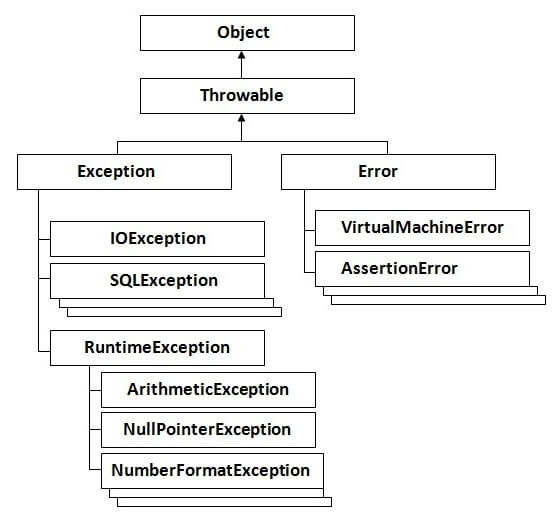
Hierarchy of Exception classes
Types of Exception:
There are mainly two types of exceptions: checked and unchecked where error is considered as unchecked exception. The sun microsystem says there are three types of exceptions:
Checked Exception
Unchecked Exception
Error
What is the difference between checked and unchecked exceptions ?
1)Checked Exception
The classes that extend Throwable class except RuntimeException and Error are known as checked exceptions e.g.IOException, SQLException etc. Checked exceptions are checked at compile-time.
2)Unchecked Exception
The classes that extend RuntimeException are known as unchecked exceptions e.g. ArithmeticException, NullPointerException, ArrayIndexOutOfBoundsException etc. Unchecked exceptions are not checked at compile-time rather they are checked at runtime.
3)Error
Error is irrecoverable e.g. OutOfMemoryError, VirtualMachineError, AssertionError etc.
Common scenarios of Exception Handling where exceptions may occur
There are given some scenarios where unchecked exceptions can occur. They are as follows:
1) Scenario where ArithmeticException occurs
If we divide any number by zero, there occurs an ArithmeticException.
int a=50/0;//ArithmeticException
2) Scenario where NullPointerException occurs
If we have null value in any variable, performing any operation by the variable occurs an NullPointerException.
The wrong formatting of any value, may occur NumberFormatException. Suppose I have a string variable that have characters, converting this variable into digit will occur NumberFormatException.
String s="abc";
int i=Integer.parseInt(s);//NumberFormatException
4) Scenario where ArrayIndexOutOfBoundsException occurs
If you are inserting any value in the wrong index, it would result ArrayIndexOutOfBoundsException as shown below:
int a[]=newint[5];
a[10]=50; //ArrayIndexOutOfBoundsException
Use of try-catch block in Exception handling:
Five keywords used in Exception handling:
try
catch
finally
throw
throws
try block
Enclose the code that might throw an exception in try block. It must be used within the method and must be followed by either catch or finally block.
Syntax of try with catch block
try{
...
}catch(Exception_class_Name reference){}
Syntax of try with finally block
try{
...
}finally{}
catch block
Catch block is used to handle the Exception. It must be used after the try block.
Problem without exception handling
class Simple{
publicstaticvoid main(String args[]){
int data=50/0;
System.out.println("rest of the code...");
}
}
Output:Exception in thread main java.lang.ArithmeticException:/ by zero
As displayed in the above example, rest of the code is not executed i.e. rest of the code... statement is not printed. Let's see what happens behind the scene:
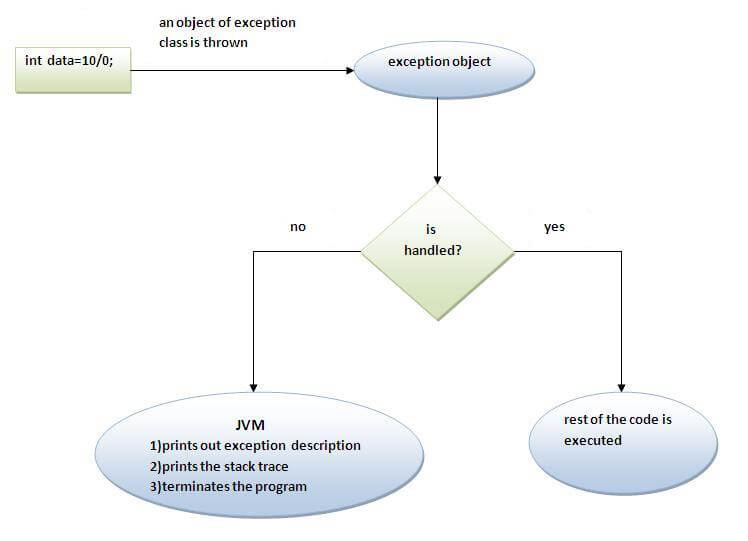
What happens behind the code int a=50/0;
The JVM firstly checks whether the exception is handled or not. If exception is not handled, JVM provides a default exception handler that performs the following tasks:
Prints out exception description.
Prints the stack trace (Hierarchy of methods where the exception occurred).
Causes the program to terminate.
But if exception is handled by the application programmer, normal flow of the application is maintained i.e. rest of the code is executed.
try block within a try block is known as nested try block.
Why use nested try block?
Sometimes a situation may arise where a part of a block may cause one error and the entire block itself may cause another error. In such cases, exception handlers have to be nested
.jpg)

 Posts
Posts


No comments:
Post a Comment