Output:Ravi
       Vijay
       Ravi
       Ajay
List Interface:
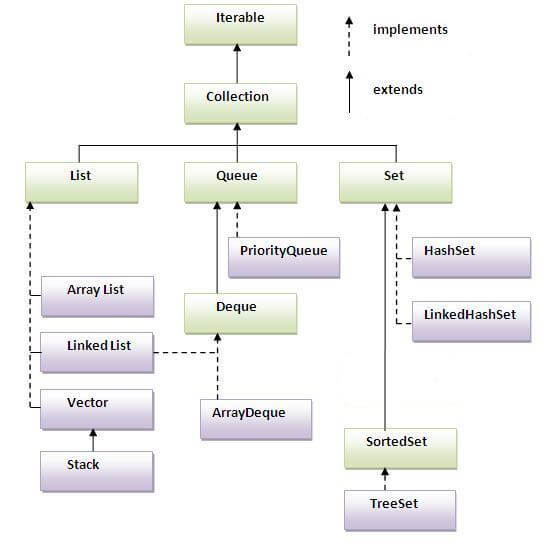
List Interface is the subinterface of Collection.It contains methods to insert and delete elements in index basis.It is a factory of ListIterator interface.
Commonly used methods of List Interface:
- public void add(int index,Object element);
- public boolean addAll(int index,Collection c);
- public object get(int Index position);
- public object set(int index,Object element);
- public object remove(int index);
- public ListIterator listIterator();
- public ListIterator listIterator(int i);
ListIterator Interface:
ListIterator Interface is used to traverse the element in backward and forward direction.
Commonly used methods of ListIterator Interface:
- public boolean hasNext();
- public Object next();
- public boolean hasPrevious();
- public Object previous();
Example of ListIterator Interface:
- import java.util.*;
- class Simple5{
- public static void main(String args[]){
-
- ArrayList al=new ArrayList();
- al.add("Amit");
- al.add("Vijay");
- al.add("Kumar");
- al.add(1,"Sachin");
-
- System.out.println("element at 2nd position: "+al.get(2));
-
- ListIterator itr=al.listIterator();
-
- System.out.println("traversing elements in forward direction...");
- while(itr.hasNext()){
- System.out.println(itr.next());
- }
-
-
- System.out.println("traversing elements in backward direction...");
- while(itr.hasPrevious()){
- System.out.println(itr.previous());
- }
- }
- }
Output:element at 2nd position: Vijay
traversing elements in forward direction...
Amit
Sachin
Vijay
Kumar
traversing elements in backward direction...
Kumar
Vijay
Sachin
Amit
Difference between List and Set:
List can contain duplicate elements whereas Set contains unique elements only.
HashSet class:
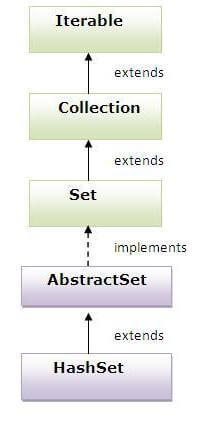
- uses hashtable to store the elements.It extends AbstractSet class and implements Set interface.
- contains unique elements only.
Hierarchy of HashSet class:
Example of HashSet class:
- import java.util.*;
- class Simple{
- public static void main(String args[]){
-
- HashSet al=new HashSet();
- al.add("Ravi");
- al.add("Vijay");
- al.add("Ravi");
- al.add("Ajay");
-
- Iterator itr=al.iterator();
- while(itr.hasNext()){
- System.out.println(itr.next());
- }
- }
- }
Output:Ajay
Vijay
Ravi
LinkedHashSet class:
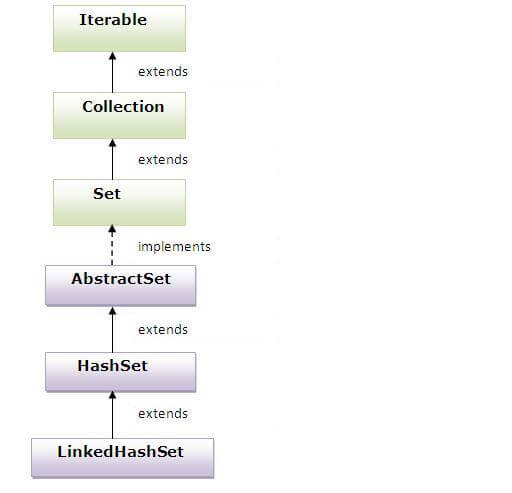
- contains unique elements only like HashSet. It extends HashSet class and implements Set interface.
- maintains insertion order.
Hierarchy of LinkedHashSet class:
Example of LinkedHashSet class:
- import java.util.*;
- class Simple{
- public static void main(String args[]){
-
- LinkedHashSet al=new LinkedHashSet();
- al.add("Ravi");
- al.add("Vijay");
- al.add("Ravi");
- al.add("Ajay");
-
- Iterator itr=al.iterator();
- while(itr.hasNext()){
- System.out.println(itr.next());
- }
- }
- }
Output:>Ravi
Vijay
Ajay
TreeSet class:
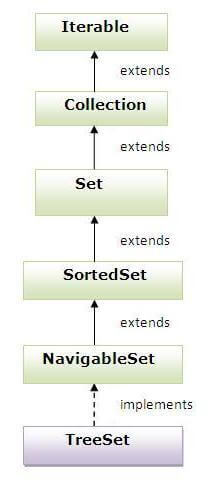
- contains unique elements only like HashSet. The TreeSet class implements NavigableSet interface that extends the SortedSet interface.
- maintains ascending order.
Hierarchy of TreeSet class:
Example of TreeSet class:
- import java.util.*;
- class Simple{
- public static void main(String args[]){
-
- TreeSet al=new TreeSet();
- al.add("Ravi");
- al.add("Vijay");
- al.add("Ravi");
- al.add("Ajay");
-
- Iterator itr=al.iterator();
- while(itr.hasNext()){
- System.out.println(itr.next());
- }
- }
- }
Queue Interface:
The Queue interface basically orders the element in FIFO(First In First Out)manner.
Methods of Queue Interface :
- public boolean add(object);
- public boolean offer(object);
- public remove();
- public poll();
- public element();
- public peek();
PriorityQueue class:
The PriorityQueue class provides the facility of using queue. But it does not orders the elements in FIFO manner.
Example of PriorityQueue:
- import java.util.*;
- class Simple8{
- public static void main(String args[]){
-
- PriorityQueue queue=new PriorityQueue();
- queue.add("Amit");
- queue.add("Vijay");
- queue.add("Karan");
- queue.add("Jai");
- queue.add("Rahul");
-
- System.out.println("head:"+queue.element());
- System.out.println("head:"+queue.peek());
-
- System.out.println("iterating the queue elements:");
- Iterator itr=queue.iterator();
- while(itr.hasNext()){
- System.out.println(itr.next());
- }
-
- queue.remove();
- queue.poll();
-
- System.out.println("after removing two elements:");
- Iterator itr2=queue.iterator();
- while(itr2.hasNext()){
- System.out.println(itr2.next());
- }
-
- }
- }
Output:head:Amit
head:Amit
iterating the queue elements:
Amit
Jai
Karan
Vijay
Rahul
after removing two elements:
Karan
Rahul
Vijay
Sorting
We can sort the elements of:
- String objects
- Wrapper class objects
- User-defined class objects
| Collections class provides static methods for sorting the elements of collection.If collection elements are of Set type, we can use TreeSet.But We cannot sort the elements of List.Collections class provides methods for sorting the elements of List type elements. |
Method of Collections class for sorting List elements
| public void sort(List list): is used to sort the elements of List.List elements must be of Comparable type. |
Note: String class and Wrapper classes implements the Comparable interface.So if you store the objects of string or wrapper classes, it will be Comparable.
Example of Sorting the elements of List that contains string objects
- import java.util.*;
- class Simple12{
- public static void main(String args[]){
-
- ArrayList al=new ArrayList();
- al.add("Viru");
- al.add("Saurav");
- al.add("Mukesh");
- al.add("Tahir");
-
- Collections.sort(al);
- Iterator itr=al.iterator();
- while(itr.hasNext()){
- System.out.println(itr.next());
- }
- }
- }
Output:Mukesh
Saurav
Tahir
Viru
Example of Sorting the elements of List that contains Wrapper class objects
- import java.util.*;
- class Simple12{
- public static void main(String args[]){
-
- ArrayList al=new ArrayList();
- al.add(Integer.valueOf(201));
- al.add(Integer.valueOf(101));
- al.add(230);
-
- Collections.sort(al);
-
- Iterator itr=al.iterator();
- while(itr.hasNext()){
- System.out.println(itr.next());
- }
- }
- }
Output:101
201
230
Comparable interface
Comparable interface is used to order the objects of user-defined class.This interface is found in java.lang package and contains only one method named compareTo(Object).It provide only single sorting sequence i.e. you can sort the elements on based on single datamember only.For instance it may be either rollno,name,age or anything else.
Syntax:
| public int compareTo(Object obj): is used to compare the current object with the specified object. |
We can sort the elements of:
- String objects
- Wrapper class objects
- User-defined class objects
| Collections class provides static methods for sorting the elements of collection.If collection elements are of Set type, we can use TreeSet.But We cannot sort the elements of List.Collections class provides methods for sorting the elements of List type elements. |
Method of Collections class for sorting List elements
| public void sort(List list): is used to sort the elements of List.List elements must be of Comparable type. |
Note: String class and Wrapper classes implements the Comparable interface.So if you store the objects of string or wrapper classes, it will be Comparable.
Example of Sorting the elements of List that contains user-defined class objects on age basis
Student.java
- class Student implements Comparable{
- int rollno;
- String name;
- int age;
- Student(int rollno,String name,int age){
- this.rollno=rollno;
- this.name=name;
- this.age=age;
- }
-
- public int compareTo(Object obj){
- Student st=(Student)obj;
- if(age==st.age)
- return 0;
- else if(age>st.age)
- return 1;
- else
- return -1;
- }
-
- }
Simple.java
- import java.util.*;
- import java.io.*;
-
- class Simple{
- public static void main(String args[]){
-
- ArrayList al=new ArrayList();
- al.add(new Student(101,"Vijay",23));
- al.add(new Student(106,"Ajay",27));
- al.add(new Student(105,"Jai",21));
-
- Collections.sort(al);
- Iterator itr=al.iterator();
- while(itr.hasNext()){
- Student st=(Student)itr.next();
- System.out.println(st.rollno+""+st.name+""+st.age);
- }
- }
- }
Output:105 Jai 21
101 Vijay 23
106 Ajay 27
Comparator interface
Comparator interface is used to order the objects of user-defined class.
This interface is found in java.util package and contains 2 methods compare(Object obj1,Object obj2) and equals(Object element).
It provides multiple sorting sequence i.e. you can sort the elements based on any data member. For instance it may be on rollno, name, age or anything else.
Syntax of compare method
public int compare(Object obj1,Object obj2): compares the first object with second object.
Collections class provides static methods for sorting the elements of collection. If collection elements are of Set type, we can use TreeSet. But We cannot sort the elements of List. Collections class provides methods for sorting the elements of List type elements.
Method of Collections class for sorting List elements
public void sort(List list,Comparator c): is used to sort the elements of List by the given comparator.
Example of sorting the elements of List that contains user-defined class objects on the basis of age and name
In this example, we have created 4 java classes:
- Student.java
- AgeComparator.java
- NameComparator.java
- Simple.java
Student.javaThis class contains three fields rollno, name and age and a parameterized constructor.
- class Student{
- int rollno;
- String name;
- int age;
- Student(int rollno,String name,int age){
- this.rollno=rollno;
- this.name=name;
- this.age=age;
- }
- }
AgeComparator.javaThis class defines comparison logic based on the age. If age of first object is greater than the second, we are returning positive value, it can be any one such as 1, 2 , 10 etc. If age of first object is less than the second object, we are returning negative value, it can be any negative value and if age of both objects are equal, we are returning 0.
- import java.util.*;
- class AgeComparator implements Comparator{
- public int Compare(Object o1,Object o2){
- Student s1=(Student)o1;
- Student s2=(Student)o2;
-
- if(s1.age==s2.age)
- return 0;
- else if(s1.age>s2.age)
- return 1;
- else
- return -1;
- }
- }
NameComparator.javaThis class provides comparison logic based on the name. In such case, we are using the compareTo() method of String class, which internally provides the comparison logic.
- import java.util.*;
- class NameComparator implements Comparator{
- public int Compare(Object o1,Object o2){
- Student s1=(Student)o1;
- Student s2=(Student)o2;
-
- return s1.name.compareTo(s2.name);
- }
- }
Simple.javaIn this class, we are printing the objects values by sorting on the basis of name and age.
- import java.util.*;
- import java.io.*;
-
- class Simple{
- public static void main(String args[]){
-
- ArrayList al=new ArrayList();
- al.add(new Student(101,"Vijay",23));
- al.add(new Student(106,"Ajay",27));
- al.add(new Student(105,"Jai",21));
-
- System.out.println("Sorting by Name...");
-
- Collections.sort(al,new NameComparator());
- Iterator itr=al.iterator();
- while(itr.hasNext()){
- Student st=(Student)itr.next();
- System.out.println(st.rollno+" "+st.name+" "+st.age);
- }
-
- System.out.println("sorting by age...");
-
- Collections.sort(al,new AgeComparator());
- Iterator itr2=al.iterator();
- while(itr2.hasNext()){
- Student st=(Student)itr2.next();
- System.out.println(st.rollno+" "+st.name+" "+st.age);
- }
-
-
- }
- }
Output:Sorting by Name...
106 Ajay 27
105 Jai 21
101 Vijay 23
Sorting by age...
105 Jai 21
101 Vijay 23
106 Ajay 27
Properties class in Java
The
properties object contains key and value pair both as a string. It is the subclass of Hashtable.
It can be used to get property value based on the property key. The Properties class provides methods to get data from properties file and store data into properties file. Moreover, it can be used to get properties of system.
Advantage of properties file
Easy Maintenance: If any information is changed from the properties file, you don't need to recompile the java class. It is mainly used to contain variable information i.e. to be changed.
Methods of Properties class
The commonly used methods of Properties class are given below.
| Method | Description |
|---|
| public void load(Reader r) | loads data from the Reader object. |
| public void load(InputStream is) | loads data from the InputStream object |
| public String getProperty(String key) | returns value based on the key. |
| public void setProperty(String key,String value) | sets the property in the properties object. |
| public void store(Writer w, String comment) | writers the properties in the writer object. |
| public void store(OutputStream os, String comment) | writes the properties in the OutputStream object. |
| storeToXML(OutputStream os, String comment) | writers the properties in the writer object for generating xml document. |
| public void storeToXML(Writer w, String comment, String encoding) | writers the properties in the writer object for generating xml document with specified encoding. |
Example of Properties class to get information from properties file
To get information from the properties file, create the properties file first.
db.properties
- user=system
- password=oracle
Now, lets create the java class to read the data from the properties file.
Test.java
- import java.util.*;
- import java.io.*;
- public class Test {
- public static void main(String[] args)throws Exception{
- FileReader reader=new FileReader("db.properties");
-
- Properties p=new Properties();
- p.load(reader);
-
- System.out.println(p.getProperty("user"));
- System.out.println(p.getProperty("password"));
- }
- }
Now if you change the value of the properties file, you don't need to compile the java class again. That means no maintenance problem.
Example of Properties class to get all the system properties
By System.getProperties() method we can get all the properties of system. Let's create the class that gets information from the system properties.
Test.java
- import java.util.*;
- import java.io.*;
- public class Test {
- public static void main(String[] args)throws Exception{
-
- Properties p=System.getProperties();
- Set set=p.entrySet();
-
- Iterator itr=set.iterator();
- while(itr.hasNext()){
- Map.Entry entry=(Map.Entry)itr.next();
- System.out.println(entry.getKey()+" = "+entry.getValue());
- }
-
- }
- }
Output:
java.runtime.name = Java(TM) SE Runtime Environment
sun.boot.library.path = C:\Program Files\Java\jdk1.7.0_01\jre\bin
java.vm.version = 21.1-b02
java.vm.vendor = Oracle Corporation
java.vendor.url = http://java.oracle.com/
path.separator = ;
java.vm.name = Java HotSpot(TM) Client VM
file.encoding.pkg = sun.io
user.country = US
user.script =
sun.java.launcher = SUN_STANDARD
...........
Example of Properties class to create properties file
Now lets write the code to create the properties file.
Test.java
- import java.util.*;
- import java.io.*;
- public class Test {
- public static void main(String[] args)throws Exception{
-
- Properties p=new Properties();
- p.setProperty("name","Sonoo Jaiswal");
- p.setProperty("email","sonoojaiswal@javatpoint.com");
-
- p.store(new FileWriter("info.properties"),"Javatpoint Properties Example");
-
- }
- }
Let's see the generated properties file.
info.properties
- #Javatpoint Properties Example
- #Thu Oct 03 22:35:53 IST 2013
- email=sonoojaiswal@javatpoint.com
- name=Sonoo Jaiswal
.jpg)


 Posts
Posts


No comments:
Post a Comment