.jpg)
What is an Event?
Change in the state of an object is known as event i.e. event describes the change in state of source. Events are generated as result of user interaction with the graphical user interface components. For example, clicking on a button, moving the mouse, entering a character through keyboard,selecting an item from list, scrolling the page are the activities that causes an event to happen.
Types of Event
The events can be broadly classified into two categories:
- Foreground Events - Those events which require the direct interaction of user.They are generated as consequences of a person interacting with the graphical components in Graphical User Interface. For example, clicking on a button, moving the mouse, entering a character through keyboard,selecting an item from list, scrolling the page etc.
- Background Events - Those events that require the interaction of end user are known as background events. Operating system interrupts, hardware or software failure, timer expires, an operation completion are the example of background events.
What is Event Handling?
Event Handling is the mechanism that controls the event and decides what should happen if an event occurs. This mechanism have the code which is known as event handler that is executed when an event occurs. Java Uses the Delegation Event Model to handle the events. This model defines the standard mechanism to generate and handle the events.Let's have a brief introduction to this model.
The Delegation Event Model has the following key participants namely:
- Source - The source is an object on which event occurs. Source is responsible for providing information of the occurred event to it's handler. Java provide as with classes for source object.
- Listener - It is also known as event handler.Listener is responsible for generating response to an event. From java implementation point of view the listener is also an object. Listener waits until it receives an event. Once the event is received , the listener process the event an then returns.
The benefit of this approach is that the user interface logic is completely separated from the logic that generates the event. The user interface element is able to delegate the processing of an event to the separate piece of code. In this model ,Listener needs to be registered with the source object so that the listener can receive the event notification. This is an efficient way of handling the event because the event notifications are sent only to those listener that want to receive them.
Steps involved in event handling
- The User clicks the button and the event is generated.
- Now the object of concerned event class is created automatically and information about the source and the event get populated with in same object.
- Event object is forwarded to the method of registered listener class.
- the method is now get executed and returns.
Points to remember about listener
- In order to design a listener class we have to develop some listener interfaces.These Listener interfaces forecast some public abstract callback methods which must be implemented by the listener class.
- If you do not implement the any if the predefined interfaces then your class can not act as a listener class for a source object.
Callback Methods
These are the methods that are provided by API provider and are defined by the application programmer and invoked by the application developer. Here the callback methods represents an event method. In response to an event java jre will fire callback method. All such callback methods are provided in listener interfaces.
If a component wants some listener will listen to it's events the the source must register itself to the listener.
Event Handling Example
Create the following java program using any editor of your choice in say D:/ > AWT > com > tutorialspoint > gui >
AwtControlDemo.javapackage com.tutorialspoint.gui; import java.awt.*; import java.awt.event.*; public class AwtControlDemo { private Frame mainFrame; private Label headerLabel; private Label statusLabel; private Panel controlPanel; public AwtControlDemo(){ prepareGUI(); } public static void main(String[] args){ AwtControlDemo awtControlDemo = new AwtControlDemo(); awtControlDemo.showEventDemo(); } private void prepareGUI(){ mainFrame = new Frame("Java AWT Examples"); mainFrame.setSize(400,400); mainFrame.setLayout(new GridLayout(3, 1)); mainFrame.addWindowListener(new WindowAdapter() { public void windowClosing(WindowEvent windowEvent){ System.exit(0); } }); headerLabel = new Label(); headerLabel.setAlignment(Label.CENTER); statusLabel = new Label(); statusLabel.setAlignment(Label.CENTER); statusLabel.setSize(350,100); controlPanel = new Panel(); controlPanel.setLayout(new FlowLayout()); mainFrame.add(headerLabel); mainFrame.add(controlPanel); mainFrame.add(statusLabel); mainFrame.setVisible(true); } private void showEventDemo(){ headerLabel.setText("Control in action: Button"); Button okButton = new Button("OK"); Button submitButton = new Button("Submit"); Button cancelButton = new Button("Cancel"); okButton.setActionCommand("OK"); submitButton.setActionCommand("Submit"); cancelButton.setActionCommand("Cancel"); okButton.addActionListener(new ButtonClickListener()); submitButton.addActionListener(new ButtonClickListener()); cancelButton.addActionListener(new ButtonClickListener()); controlPanel.add(okButton); controlPanel.add(submitButton); controlPanel.add(cancelButton); mainFrame.setVisible(true); } private class ButtonClickListener implements ActionListener{ public void actionPerformed(ActionEvent e) { String command = e.getActionCommand(); if( command.equals( "OK" )) { statusLabel.setText("Ok Button clicked."); } else if( command.equals( "Submit" ) ) { statusLabel.setText("Submit Button clicked."); } else { statusLabel.setText("Cancel Button clicked."); } } } }
Compile the program using command prompt. Go to D:/ > AWT and type the following command.
D:\AWT>javac com\tutorialspoint\gui\AwtControlDemo.java
If no error comes that means compilation is successful. Run the program using following command.
D:\AWT>java com.tutorialspoint.gui.AwtControlDemo
Verify the following output
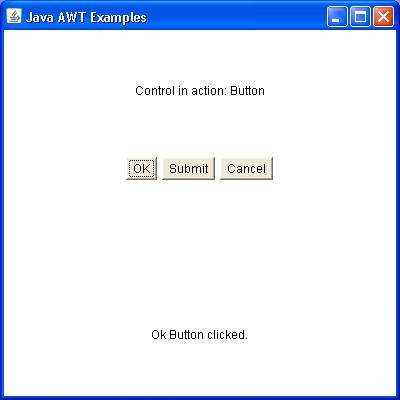
he Event classes represent the event. Java provides us various Event classes but we will discuss those which are more frequently used.
EventObject class
It is the root class from which all event state objects shall be derived. All Events are constructed with a reference to the object, the source, that is logically deemed to be the object upon which the Event in question initially occurred upon. This class is defined in java.util package.
Class declaration
Following is the declaration for java.util.EventObject class:
public class EventObject
   extends Object
      implements Serializable
Field
Following are the fields for java.util.EventObject class:
- protected Object source -- The object on which the Event initially occurred.
Class constructors
| S.N. | Constructor & Description |
|---|---|
| 1 | EventObject(Object source) Constructs a prototypical Event. |
Class methods
| S.N. | Method & Description |
|---|---|
| 1 | Object getSource() The object on which the Event initially occurred. |
| 2 | String toString() Returns a String representation of this EventObject. |
Methods inherited
This class inherits methods from the following classes:
- java.lang.Object
AWT Event Classes:
Following is the list of commonly used event classes.
| Sr. No. | Control & Description |
|---|---|
| 1 | AWTEvent It is the root event class for all AWT events. This class and its subclasses supercede the original java.awt.Event class. |
| 2 | ActionEvent The ActionEvent is generated when button is clicked or the item of a list is double clicked. |
| 3 | InputEvent The InputEvent class is root event class for all component-level input events. |
| 4 | KeyEvent On entering the character the Key event is generated. |
| 5 | MouseEvent This event indicates a mouse action occurred in a component. |
| 6 | TextEvent The object of this class represents the text events. |
| 7 | WindowEvent The object of this class represents the change in state of a window. |
| 8 | AdjustmentEvent The object of this class represents the adjustment event emitted by Adjustable objects. |
| 9 | ComponentEvent The object of this class represents the change in state of a window. |
| 10 | ContainerEvent The object of this class represents the change in state of a window. |
| 11 | MouseMotionEvent The object of this class represents the change in state of a window. |
| 12 | PaintEvent The object of this class represents the change in state of a window. |
The Event listener represent the interfaces responsible to handle events. Java provides us various Event listener classes but we will discuss those which are more frequently used. Every method of an event listener method has a single argument as an object which is subclass of EventObject class. For example, mouse event listener methods will accept instance of MouseEvent, where MouseEvent derives from EventObject.
EventListner interface
It is a marker interface which every listener interface has to extend.This class is defined in java.util package.
Class declaration
Following is the declaration for java.util.EventListener interface:
public interface EventListener
AWT Event Listener Interfaces:
Following is the list of commonly used event listeners.
| Sr. No. | Control & Description |
|---|---|
| 1 | ActionListener This interface is used for receiving the action events. |
| 2 | ComponentListener This interface is used for receiving the component events. |
| 3 | ItemListener This interface is used for receiving the item events. |
| 4 | KeyListener This interface is used for receiving the key events. |
| 5 | MouseListener This interface is used for receiving the mouse events. |
| 6 | TextListener This interface is used for receiving the text events. |
| 7 | WindowListener This interface is used for receiving the window events. |
| 8 | AdjustmentListener This interface is used for receiving the adjusmtent events. |
| 9 | ContainerListener This interface is used for receiving the container events. |
| 10 | MouseMotionListener This interface is used for receiving the mouse motion events. |
| 11 | FocusListener This interface is used for receiving the focus events. |
AWT Event Adapter:
Adapters are abstract classes for receiving various events. The methods in these classes are empty. These classes exists as convenience for creating listener objects.
AWT Adapters:
Following is the list of commonly used adapters while listening GUI events in AWT.
| Sr. No. | Adapter & Description |
|---|---|
| 1 | FocusAdapter An abstract adapter class for receiving focus events. |
| 2 | KeyAdapter An abstract adapter class for receiving key events. |
| 3 | MouseAdapter An abstract adapter class for receiving mouse events. |
| 4 | MouseMotionAdapter An abstract adapter class for receiving mouse motion events. |
| 5 | WindowAdapter An abstract adapter class for receiving window events. |

 Posts
Posts


No comments:
Post a Comment