Featured Article

Friday, 24 October 2014

Unicode System

Unicode System

Unicode is a universal international standard character encoding that is capable of representing most of the world's written languages.

Why java uses Unicode System?

Before Unicode, there were many language standards:
  • ASCII (American Standard Code for Information Interchange) for the United States.
  • ISO 8859-1 for Western European Language.
  • KOI-8 for Russian.
  • GB18030 and BIG-5 for chinese, and so on.
This caused two problems:
  1. A particular code value corresponds to different letters in the various language standards.
  2. The encodings for languages with large character sets have variable length.Some common characters are encoded as single bytes, other require two or more byte.
To solve these problems, a new language standard was developed i.e. Unicode System.
In unicode, character holds 2 byte, so java also uses 2 byte for characters.
lowest value:\u0000
highest value:\uFFFF

Wednesday, 22 October 2014

Difference between JDK, JRE and JVM

Difference between JDK, JRE and JVM

  1. Brief summary of JVM
  2. Java Runtime Environment (JRE)
  3. Java Development Kit (JDK)
Understanding the difference between JDK, JRE and JVM is important in Java. We are having brief overview of JVM here.
If you want to get the detailed knowledge of Java Virtural Machine, move to the next page. Firstly, let's see the basic differences between the JDK, JRE and JVM.


JVM

JVM (Java Virtual Machine) is an abstract machine. It is a specification that provides runtime environment in which java bytecode can be executed.
JVMs are available for many hardware and software platforms. JVM, JRE and JDK are platform dependent because configuration of each OS differs. But, Java is platform independent.
The JVM performs following main tasks:
  • Loads code
  • Verifies code
  • Executes code
  • Provides runtime environment

JRE

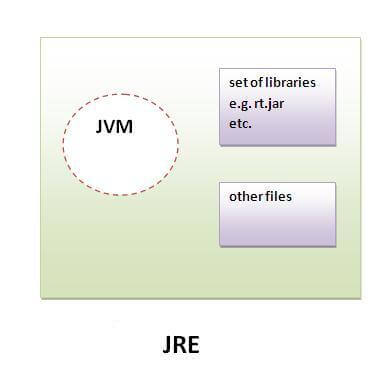
JRE is an acronym for Java Runtime Environment.It is used to provide runtime environment.It is the implementation of JVM.It physically exists.It contains set of libraries + other files that JVM uses at runtime.
Implementation of JVMs are also actively released by other companies besides Sun Micro Systems.
jre

JDK

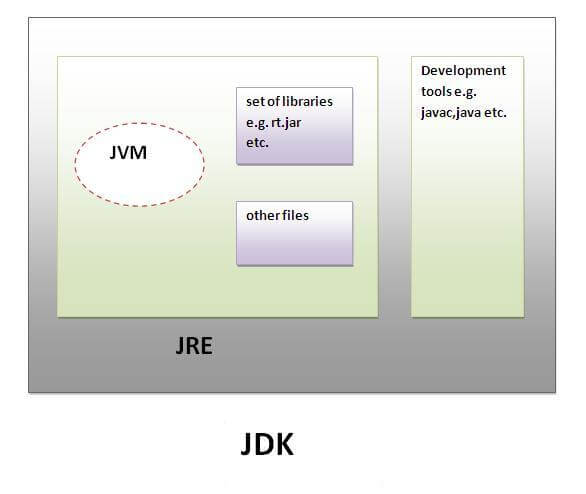
JDK is an acronym for Java Development Kit.It physically exists.It contains JRE + development tools.
jdk

Friday, 17 October 2014

JDBC Overview


JDBC

The JDBC ( Java Database Connectivity) API defines interfaces and classes for writing database applications in Java by making database connections. Using JDBC you can send SQL, PL/SQL statements to almost any relational database. JDBC is a Java API for executing SQL statements and supports basic SQL functionality. It provides RDBMS access by allowing you to embed SQL inside Java code. Because Java can run on a thin client, applets embedded in Web pages can contain downloadable JDBC code to enable remote database access. You will learn how to create a table, insert values into it, query the table, retrieve results, and update the table with the help of a JDBC Program example.

Although JDBC was designed specifically to provide a Java interface to relational databases, you may find that you need to write Java code to access non-relational databases as well.

JDBC Architecture

Java application calls the JDBC library. JDBC loads a driver which talks to the database. We can change database engines without changing database code.

JDBC Basics – Java Database Connectivity Steps

Before you can create a java jdbc connection to the database, you must first import the
java.sql package.

import java.sql.*; 


The star ( * ) indicates that all of the classes in the package java.sql are to be imported.

1. Loading a database driver,
In this step of the jdbc connection process, we load the driver class by calling Class.forName() with the Driver class name as an argument. Once loaded, the Driver class creates an instance of itself. A client can connect to Database Server through JDBC Driver. Since most of the Database servers support ODBC driver therefore JDBC-ODBC Bridge driver is commonly used.
The return type of the Class.forName (String ClassName) method is “Class”. Class is a class in
java.lang package.
try {
 Class.forName(”sun.jdbc.odbc.JdbcOdbcDriver”); //Or any other driver
}
catch(Exception x){
 System.out.println( “Unable to load the driver class!” );
}

2. Creating a oracle jdbc Connection

The JDBC DriverManager class defines objects which can connect Java applications to a JDBC driver. DriverManager is considered the backbone of JDBC architecture. DriverManager class manages the JDBC drivers that are installed on the system. Its getConnection() method is used to establish a connection to a database. It uses a username, password, and a jdbc url to establish a connection to the database and returns a connection object. A jdbc Connection represents a session/connection with a specific database. Within the context of a Connection, SQL, PL/SQL statements are executed and results are returned. An application can have one or more connections with a single database, or it can have many connections with different databases. A Connection object provides metadata i.e. information about the database, tables, and fields. It also contains methods to deal with transactions.
JDBC URL Syntax::    jdbc: <subprotocol>: <subname>
JDBC URL Example:: jdbc: <subprotocol>: <subname>•Each driver has its own subprotocol
•Each subprotocol has its own syntax for the source. We’re using the jdbc odbc subprotocol, so the DriverManager knows to use the sun.jdbc.odbc.JdbcOdbcDriver.
try{
 Connection dbConnection=DriverManager.getConnection(url,”loginName”,”Password”)
}
catch( SQLException x ){
 System.out.println( “Couldn’t get connection!” );
}
3. Creating a jdbc Statement object,
Once a connection is obtained we can interact with the database. Connection interface defines methods for interacting with the database via the established connection. To execute SQL statements, you need to instantiate a Statement object from your connection object by using the createStatement() method.
Statement statement = dbConnection.createStatement();
A statement object is used to send and execute SQL statements to a database.
Three kinds of Statements
Statement: Execute simple sql queries without parameters.
Statement createStatement()
Creates an SQL Statement object.
Prepared Statement: Execute precompiled sql queries with or without parameters.
PreparedStatement prepareStatement(String sql)
returns a new PreparedStatement object. PreparedStatement objects are precompiled
SQL statements.
Callable Statement: Execute a call to a database stored procedure.
CallableStatement prepareCall(String sql)
returns a new CallableStatement object. CallableStatement objects are SQL stored procedure call statements.
4. Executing a SQL statement with the Statement object, and returning a jdbc resultSet.

Statement interface defines methods that are used to interact with database via the execution of SQL statements. The Statement class has three methods for executing statements:
executeQuery(), executeUpdate(), and execute(). For a SELECT statement, the method to use is executeQuery . For statements that create or modify tables, the method to use is executeUpdate. Note: Statements that create a table, alter a table, or drop a table are all examples of DDL
statements and are executed with the method executeUpdate. execute() executes an SQL
statement that is written as String object.
ResultSet provides access to a table of data generated by executing a Statement. The table rows are retrieved in sequence. A ResultSet maintains a cursor pointing to its current row of data. The next() method is used to successively step through the rows of the tabular results.
ResultSetMetaData Interface holds information on the types and properties of the columns in a ResultSet. It is constructed from the Connection object.

Test JDBC Driver Installation

import javax.swing.JOptionPane;

 public class TestJDBCDriverInstallation_Oracle {

    public static void main(String[] args) {
    StringBuffer output  = new StringBuffer();
    output.append(”Testing oracle driver installation \n”);
    try {
     String className = “sun.jdbc.odbc.JdbcOdbcDriver”;
     Class driverObject = Class.forName(className);
     output.append(”Driver : “+driverObject+”\n”);
     output.append(”Driver Installation Successful”);
     JOptionPane.showMessageDialog(null, output);
      } catch (Exception e) {
       output  = new StringBuffer();
       output.append(”Driver Installation FAILED\n”);
       JOptionPane.showMessageDialog(null, output);
    System.out.println(”Failed: Driver Error: ” + e.getMessage());
    }
     }
 }
Download JDBC Sample Code

Java JDBC Connection Example, JDBC Driver Example

import java.sql.Connection;
import java.sql.DatabaseMetaData;
import java.sql.DriverManager;
import java.sql.SQLException;

public class JDBCDriverInformation {
 static String userid=”scott”, password = “tiger”;
 static String url = “jdbc:odbc:bob”; 
 static Connection con = null;
 public static void main(String[] args) throws Exception {
     Connection con = getOracleJDBCConnection();
     if(con!= null){
        System.out.println(”Got Connection.”);
        DatabaseMetaData meta = con.getMetaData();
        System.out.println(”Driver Name : “+meta.getDriverName());
        System.out.println(”Driver Version : “+meta.getDriverVersion());

     }else{
      System.out.println(”Could not Get Connection”);
     }
 }

 public static Connection getOracleJDBCConnection(){

  try {
   Class.forName(”sun.jdbc.odbc.JdbcOdbcDriver”); 
  } catch(java.lang.ClassNotFoundException e) {
   System.err.print(”ClassNotFoundException: “);
   System.err.println(e.getMessage());
  }

  try {
     con = DriverManager.getConnection(url, userid, password);
  } catch(SQLException ex) {
   System.err.println(”SQLException: ” + ex.getMessage());
  }

  return con;
 }

}

Wednesday, 15 October 2014

SQL Primary key, Foreign Key


SQL PRIMARY KEY Constraint

The PRIMARY KEY constraint uniquely identifies each record in a database table.
Primary keys must contain unique values.
A primary key column cannot contain NULL values.
Each table should have a primary key, and each table can have only ONE primary key.

SQL PRIMARY KEY Constraint on CREATE TABLE

The following SQL creates a PRIMARY KEY on the "P_Id" column when the "Persons" table is created:

MySQL:
CREATE TABLE Persons
(
P_Id int NOT NULL,
LastName varchar(255) NOT NULL,
FirstName varchar(255),
Address varchar(255),
City varchar(255),
PRIMARY KEY (P_Id)
)

SQL Server / Oracle / MS Access:
CREATE TABLE Persons
(
P_Id int NOT NULL PRIMARY KEY,
LastName varchar(255) NOT NULL,
FirstName varchar(255),
Address varchar(255),
City varchar(255)
)
To allow naming of a PRIMARY KEY constraint, and for defining a PRIMARY KEY constraint on multiple columns, use the following SQL syntax:

MySQL / SQL Server / Oracle / MS Access:
CREATE TABLE Persons
(
P_Id int NOT NULL,
LastName varchar(255) NOT NULL,
FirstName varchar(255),
Address varchar(255),
City varchar(255),
CONSTRAINT pk_PersonID PRIMARY KEY (P_Id,LastName)
)
Note: In the example above there is only ONE PRIMARY KEY (pk_PersonID). However, the value of the pk_PersonID is made up of two columns (P_Id and LastName).


SQL PRIMARY KEY Constraint on ALTER TABLE

To create a PRIMARY KEY constraint on the "P_Id" column when the table is already created, use the following SQL:

MySQL / SQL Server / Oracle / MS Access:
ALTER TABLE Persons
ADD PRIMARY KEY (P_Id)
To allow naming of a PRIMARY KEY constraint, and for defining a PRIMARY KEY constraint on multiple columns, use the following SQL syntax:

MySQL / SQL Server / Oracle / MS Access:
ALTER TABLE Persons
ADD CONSTRAINT pk_PersonID PRIMARY KEY (P_Id,LastName)

Note: If you use the ALTER TABLE statement to add a primary key, the primary key column(s) must already have been declared to not contain NULL values (when the table was first created).

To DROP a PRIMARY KEY Constraint

To drop a PRIMARY KEY constraint, use the following SQL:

MySQL:
ALTER TABLE Persons
DROP PRIMARY KEY

SQL Server / Oracle / MS Access:
ALTER TABLE Persons
DROP CONSTRAINT pk_PersonID


SQL FOREIGN KEY Constraint

A FOREIGN KEY in one table points to a PRIMARY KEY in another table.
Let's illustrate the foreign key with an example. Look at the following two tables:
The "Persons" table:
P_IdLastNameFirstNameAddressCity
1HansenOlaTimoteivn 10Sandnes
2SvendsonToveBorgvn 23Sandnes
3PettersenKariStorgt 20Stavanger
The "Orders" table:
O_IdOrderNoP_Id
1778953
2446783
3224562
4245621
Note that the "P_Id" column in the "Orders" table points to the "P_Id" column in the "Persons" table.
The "P_Id" column in the "Persons" table is the PRIMARY KEY in the "Persons" table.
The "P_Id" column in the "Orders" table is a FOREIGN KEY in the "Orders" table.
The FOREIGN KEY constraint is used to prevent actions that would destroy links between tables.
The FOREIGN KEY constraint also prevents invalid data from being inserted into the foreign key column, because it has to be one of the values contained in the table it points to.

SQL FOREIGN KEY Constraint on CREATE TABLE

The following SQL creates a FOREIGN KEY on the "P_Id" column when the "Orders" table is created:
MySQL:
CREATE TABLE Orders
(
O_Id int NOT NULL,
OrderNo int NOT NULL,
P_Id int,
PRIMARY KEY (O_Id),
FOREIGN KEY (P_Id) REFERENCES Persons(P_Id)
)
SQL Server / Oracle / MS Access:
CREATE TABLE Orders
(
O_Id int NOT NULL PRIMARY KEY,
OrderNo int NOT NULL,
P_Id int FOREIGN KEY REFERENCES Persons(P_Id)
)
To allow naming of a FOREIGN KEY constraint, and for defining a FOREIGN KEY constraint on multiple columns, use the following SQL syntax:

MySQL / SQL Server / Oracle / MS Access:
CREATE TABLE Orders
(
O_Id int NOT NULL,
OrderNo int NOT NULL,
P_Id int,
PRIMARY KEY (O_Id),
CONSTRAINT fk_PerOrders FOREIGN KEY (P_Id)
REFERENCES Persons(P_Id)
)


SQL FOREIGN KEY Constraint on ALTER TABLE

To create a FOREIGN KEY constraint on the "P_Id" column when the "Orders" table is already created, use the following SQL:

MySQL / SQL Server / Oracle / MS Access:
ALTER TABLE Orders
ADD FOREIGN KEY (P_Id)
REFERENCES Persons(P_Id)
To allow naming of a FOREIGN KEY constraint, and for defining a FOREIGN KEY constraint on multiple columns, use the following SQL syntax:

MySQL / SQL Server / Oracle / MS Access:
ALTER TABLE Orders
ADD CONSTRAINT fk_PerOrders
FOREIGN KEY (P_Id)
REFERENCES Persons(P_Id)


To DROP a FOREIGN KEY Constraint

To drop a FOREIGN KEY constraint, use the following SQL:

MySQL:
ALTER TABLE Orders
DROP FOREIGN KEY fk_PerOrders

SQL Server / Oracle / MS Access:
ALTER TABLE Orders
DROP CONSTRAINT fk_PerOrders

Monday, 13 October 2014

SQL General Data Types


SQL General Data Types

A data type defines what kind of value a column can contain.

SQL General Data Types

Each column in a database table is required to have a name and a data type.
SQL developers have to decide what types of data will be stored inside each and every table column when creating a SQL table. The data type is a label and a guideline for SQL to understand what type of data is expected inside of each column, and it also identifies how SQL will interact with the stored data.
The following table lists the general data types in SQL:
Data typeDescription
CHARACTER(n)Character string. Fixed-length n
VARCHAR(n) or
CHARACTER VARYING(n)
Character string. Variable length. Maximum length n
BINARY(n)Binary string. Fixed-length n
BOOLEANStores TRUE or FALSE values
VARBINARY(n) or
BINARY VARYING(n)
Binary string. Variable length. Maximum length n
INTEGER(p)Integer numerical (no decimal). Precision p
SMALLINTInteger numerical (no decimal). Precision 5
INTEGERInteger numerical (no decimal). Precision 10
BIGINTInteger numerical (no decimal). Precision 19
DECIMAL(p,s)Exact numerical, precision p, scale s. Example: decimal(5,2) is a number that has 3 digits before the decimal and 2 digits after the decimal
NUMERIC(p,s)Exact numerical, precision p, scale s. (Same as DECIMAL)
FLOAT(p)Approximate numerical, mantissa precision p. A floating number in base 10 exponential notation. The size argument for this type consists of a single number specifying the minimum precision
REALApproximate numerical, mantissa precision 7
FLOATApproximate numerical, mantissa precision 16
DOUBLE PRECISIONApproximate numerical, mantissa precision 16
DATEStores year, month, and day values
TIMEStores hour, minute, and second values
TIMESTAMPStores year, month, day, hour, minute, and second values
INTERVALComposed of a number of integer fields, representing a period of time, depending on the type of interval
ARRAYA set-length and ordered collection of elements
MULTISETA variable-length and unordered collection of elements
XMLStores XML data


SQL Data Type Quick Reference

However, different databases offer different choices for the data type definition.
The following table shows some of the common names of data types between the various database platforms:
Data typeAccessSQLServerOracleMySQLPostgreSQL
booleanYes/NoBitByteN/ABoolean
integerNumber (integer)IntNumberInt
Integer
Int
Integer
floatNumber (single)Float
Real
NumberFloatNumeric
currencyCurrencyMoneyN/AN/AMoney
string (fixed)N/ACharCharCharChar
string (variable)Text (<256)
Memo (65k+)
VarcharVarchar
Varchar2
VarcharVarchar
binary objectOLE Object MemoBinary (fixed up to 8K)
Varbinary (<8K)
Image (<2GB)
Long
Raw
Blob
Text
Binary
Varbinary

Saturday, 11 October 2014

SQL Date

SQL Dates

NoteThe most difficult part when working with dates is to be sure that the format of the date you are trying to insert, matches the format of the date column in the database.
As long as your data contains only the date portion, your queries will work as expected. However, if a time portion is involved, it gets complicated.
Before talking about the complications of querying for dates, we will look at the most important built-in functions for working with dates.

MySQL Date Functions

The following table lists the most important built-in date functions in MySQL:
FunctionDescription
NOW()Returns the current date and time
CURDATE()Returns the current date
CURTIME()Returns the current time
DATE()Extracts the date part of a date or date/time expression
EXTRACT()Returns a single part of a date/time
DATE_ADD()Adds a specified time interval to a date
DATE_SUB()Subtracts a specified time interval from a date
DATEDIFF()Returns the number of days between two dates
DATE_FORMAT()Displays date/time data in different formats


SQL Server Date Functions

The following table lists the most important built-in date functions in SQL Server:
FunctionDescription
GETDATE()Returns the current date and time
DATEPART()Returns a single part of a date/time
DATEADD()Adds or subtracts a specified time interval from a date
DATEDIFF()Returns the time between two dates
CONVERT()Displays date/time data in different formats


SQL Date Data Types

MySQL comes with the following data types for storing a date or a date/time value in the database:
  • DATE - format YYYY-MM-DD
  • DATETIME - format: YYYY-MM-DD HH:MM:SS
  • TIMESTAMP - format: YYYY-MM-DD HH:MM:SS
  • YEAR - format YYYY or YY
SQL Server comes with the following data types for storing a date or a date/time value in the database:
  • DATE - format YYYY-MM-DD
  • DATETIME - format: YYYY-MM-DD HH:MM:SS
  • SMALLDATETIME - format: YYYY-MM-DD HH:MM:SS
  • TIMESTAMP - format: a unique number
Note: The date types are chosen for a column when you create a new table in your database!
For an overview of all data types available, go to our complete Data Types reference.

SQL Working with Dates

NoteYou can compare two dates easily if there is no time component involved!
Assume we have the following "Orders" table:
 
OrderIdProductNameOrderDate
1Geitost2008-11-11
2Camembert Pierrot2008-11-09
3Mozzarella di Giovanni2008-11-11
4Mascarpone Fabioli2008-10-29
Now we want to select the records with an OrderDate of "2008-11-11" from the table above.
We use the following SELECT statement:
SELECT * FROM Orders WHERE OrderDate='2008-11-11'

The result-set will look like this:
OrderIdProductNameOrderDate
1Geitost2008-11-11
3Mozzarella di Giovanni2008-11-11
Now, assume that the "Orders" table looks like this (notice the time component in the "OrderDate" column):
OrderIdProductNameOrder        Date
1Geitost2008-11-11 13:23:44
2Camembert Pierrot2008-11-09 15:45:21
3Mozzarella di Giovanni2008-11-11 11:12:01
4Mascarpone Fabioli2008-10-29 14:56:59

If we use the same SELECT statement as above:
 
SELECT * FROM Orders WHERE OrderDate='2008-11-11'

we will get no result! This is because the query is looking only for dates with no time portion.

Tip: If you want to keep your queries simple and easy to maintain, do not allow time components in your dates!

Thursday, 9 October 2014

SQL -ALTER TABLE,Drop

SQL -ALTER TABLE,Drop


The ALTER TABLE Statement

The ALTER TABLE statement is used to add, delete, or modify columns in an existing table.

SQL ALTER TABLE Syntax

To add a column in a table, use the following syntax:
ALTER TABLE table_name
ADD column_name datatype
To delete a column in a table, use the following syntax (notice that some database systems don't allow deleting a column):
ALTER TABLE table_name
DROP COLUMN column_name
To change the data type of a column in a table, use the following syntax:
SQL Server / MS Access:
ALTER TABLE table_name
ALTER COLUMN column_name datatype
My SQL / Oracle:
ALTER TABLE table_name
MODIFY COLUMN column_name datatype
Oracle 10G and later:
ALTER TABLE table_name
MODIFY column_name datatype


SQL ALTER TABLE Example

Look at the "Persons" table:
P_IdLastNameFirstNameAddressCity
1HansenOlaTimoteivn 10Sandnes
2SvendsonToveBorgvn 23Sandnes
3PettersenKariStorgt 20Stavanger
Now we want to add a column named "DateOfBirth" in the "Persons" table.
We use the following SQL statement:
 
ALTER TABLE Persons
ADD DateOfBirth date

Notice that the new column, "DateOfBirth", is of type date and is going to hold a date. The data type specifies what type of data the column can hold. For a complete reference of all the data types available in MS Access, MySQL, and SQL Server, go to our complete Data Types reference.

The "Persons" table will now like this:
P_IdLastNameFirstNameAddressCityDateOfBirth
1HansenOlaTimoteivn 10Sandnes 
2SvendsonToveBorgvn 23Sandnes 
3PettersenKariStorgt 20Stavanger 


Change Data Type Example

Now we want to change the data type of the column named "DateOfBirth" in the "Persons" table.
We use the following SQL statement:
ALTER TABLE Persons
ALTER COLUMN DateOfBirth year
Notice that the "DateOfBirth" column is now of type year and is going to hold a year in a two-digit or four-digit format.

DROP COLUMN Example

Next, we want to delete the column named "DateOfBirth" in the "Persons" table.
We use the following SQL statement:

ALTER TABLE Persons
DROP COLUMN DateOfBirth
The "Persons" table will now like this:
P_Id        LastName  FirstName   Address       City
1Hansen   Ola      Timoteivn 10       Sandnes
2SvendsonTove      Borgvn 23       Sandnes
3PettersenKari               Storgt 20     Stavanger


Auto-increment allows a unique number to be generated when a new record is inserted into a table.

AUTO INCREMENT a Field

Very often we would like the value of the primary key field to be created automatically every time a new record is inserted.
We would like to create an auto-increment field in a table.

Syntax for MySQL

The following SQL statement defines the "ID" column to be an auto-increment primary key field in the "Persons" table:
 
CREATE TABLE Persons
(
ID int NOT NULL AUTO_INCREMENT,
LastName varchar(255) NOT NULL,
FirstName varchar(255),
Address varchar(255),
City varchar(255),
PRIMARY KEY (ID)
)
 
MySQL uses the AUTO_INCREMENT keyword to perform an auto-increment feature.
By default, the starting value for AUTO_INCREMENT is 1, and it will increment by 1 for each new record.

To let the AUTO_INCREMENT sequence start with another value, use the following SQL statement:
ALTER TABLE Persons AUTO_INCREMENT=100
To insert a new record into the "Persons" table, we will NOT have to specify a value for the "ID" column (a unique value will be added automatically):
 
INSERT INTO Persons (FirstName,LastName)
VALUES ('Lars','Monsen')

The SQL statement above would insert a new record into the "Persons" table. The "ID" column would be assigned a unique value. The "FirstName" column would be set to "Lars" and the "LastName" column would be set to "Monsen".

Syntax for SQL Server

The following SQL statement defines the "ID" column to be an auto-increment primary key field in the "Persons" table:
CREATE TABLE Persons
(
ID int IDENTITY(1,1) PRIMARY KEY,
LastName varchar(255) NOT NULL,
FirstName varchar(255),
Address varchar(255),
City varchar(255)
)
The MS SQL Server uses the IDENTITY keyword to perform an auto-increment feature.
In the example above, the starting value for IDENTITY is 1, and it will increment by 1 for each new record.

Tip: To specify that the "ID" column should start at value 10 and increment by 5, change it to IDENTITY(10,5).

To insert a new record into the "Persons" table, we will NOT have to specify a value for the "ID" column (a unique value will be added automatically):
INSERT INTO Persons (FirstName,LastName)
VALUES ('Lars','Monsen')
The SQL statement above would insert a new record into the "Persons" table. The "ID" column would be assigned a unique value. The "FirstName" column would be set to "Lars" and the "LastName" column would be set to "Monsen".

Syntax for Access

The following SQL statement defines the "ID" column to be an auto-increment primary key field in the "Persons" table:
 
CREATE TABLE Persons
(
ID Integer PRIMARY KEY AUTOINCREMENT,
LastName varchar(255) NOT NULL,
FirstName varchar(255),
Address varchar(255),
City varchar(255)
)
The MS Access uses the AUTOINCREMENT keyword to perform an auto-increment feature.
By default, the starting value for AUTOINCREMENT is 1, and it will increment by 1 for each new record.
Tip: To specify that the "ID" column should start at value 10 and increment by 5, change the autoincrement to AUTOINCREMENT(10,5).

To insert a new record into the "Persons" table, we will NOT have to specify a value for the "ID" column (a unique value will be added automatically):
 
INSERT INTO Persons (FirstName,LastName)
VALUES ('Lars','Monsen')

The SQL statement above would insert a new record into the "Persons" table. The "P_Id" column would be assigned a unique value. The "FirstName" column would be set to "Lars" and the "LastName" column would be set to "Monsen".

Syntax for Oracle

In Oracle the code is a little bit more tricky.
You will have to create an auto-increment field with the sequence object (this object generates a number sequence).
Use the following CREATE SEQUENCE syntax:
CREATE SEQUENCE seq_person
MINVALUE 1
START WITH 1
INCREMENT BY 1
CACHE 10

The code above creates a sequence object called seq_person, that starts with 1 and will increment by 1. It will also cache up to 10 values for performance. The cache option specifies how many sequence values will be stored in memory for faster access.

To insert a new record into the "Persons" table, we will have to use the nextval function (this function retrieves the next value from seq_person sequence):
 
INSERT INTO Persons (ID,FirstName,LastName)
VALUES (seq_person.nextval,'Lars','Monsen')

The SQL statement above would insert a new record into the "Persons" table. The "ID" column would be assigned the next number from the seq_person sequence. The "FirstName" column would be set to "Lars" and the "LastName" column would be set to "Monsen".